

What is Abyss Fracture FX in UE5 Niagara?
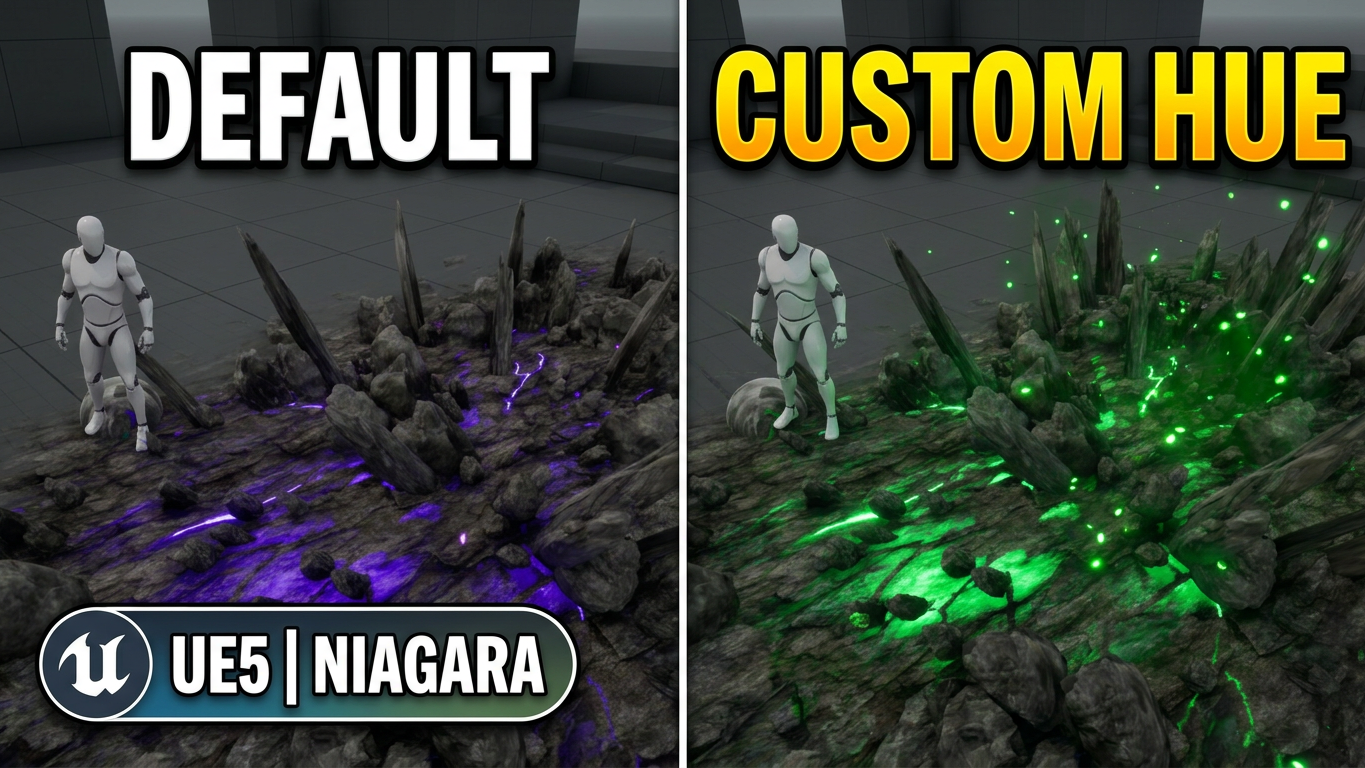
Abyss Fracture is a decal-based ground crack effect made in Unreal Engine 5 Niagara and created for Fab. Because it is projected as a decal, the fracture detail wraps cleanly over terrain, static meshes, and characters standing in the area, showing colorful particle effects emerging from textured ground layers in purple, teal, brown, and pink hues.
The showcase demonstrates its built-in controls: scale the fracture up or down directly in the scene, and shift the hue to switch between green, orange, or the default classic abyss tones. It works well for ground slams, spell impacts, and dark-magic area attacks.
Related on CGHOW: Abyssal Rupture VFX Showcase · Ground Shatter Attack FX
How is Abyss Fracture FX Structured?
The showcase highlights the core features and scene-ready parameters exposed in the Unreal Engine 5 Niagara setup:
- Decal-Based Projection: Projects clean ground fracture details across environment terrain, static meshes, and nearby characters.
- Customizable Scale Parameters: Allows you to scale the fracture effect up or down directly inside your scene.
- Color & Hue Controls: Built-in hue parameters let you switch between dynamic looks such as green, orange, or classic abyss tones.
- Scratch-Built Tutorial Breakdown: A dedicated members tutorial walks through how to build the effect from scratch in UE5 Niagara.
Abyss Fracture Breakdown
The table below summarizes the showcase sections, visual elements, and practical use cases covered in the video:
| Timestamp / Section | Focus Area | Use Case & Behavior |
|---|---|---|
| 00:00 – Intro & Overview | Abyss Fracture FX showcase | Ground slams, spell impacts, and dark-magic area attacks |
| 00:08 – Scaling Parameters | Scene scale controls | Resize the entire fracture up or down to fit any impact radius |
| 00:19 – Decal Projection | Terrain, meshes, and characters | Wraps fracture detail seamlessly over uneven ground and actors |
| 00:34 – Color & Hue Controls | Dynamic hue shifting | Switch between classic abyss hues, green, or orange palettes |
| 00:45 – Full Tutorial Info | Members breakdown & files | Learn how to build the setup from scratch or download the asset |
Tutorial Access & Project Files
- Full Breakdown Tutorial (Members): Watch the Abyss Fracture Tutorial on YouTube
- Download Project Files (Patreon Post): Abyss Fracture UE5 Niagara Download
- Get Assets on Fab: CGHOW on Fab
- Support on Patreon: Patreon – Ashif Ali
- Join YouTube Membership: CGHOW Channel Membership
- Unreal Engine VFX Course: Course Overview on YouTube
- CGHOW Website: cghow.com
- Join Discord: CGHOW Discord Community
- ArtStation Portfolio: Ashif Ali on ArtStation
- Follow on X: @cghow_ on X
- Google Creator Profile: CGHOW on Google
- Subscribe on YouTube: Subscribe to CGHOW
Frequently asked questions
Does Abyss Fracture FX project onto characters as well as terrain?
Yes. Because Abyss Fracture uses decal-based projection in Unreal Engine 5 Niagara, the fracture detail wraps across terrain, static meshes, and characters standing within the area.
What parameters can be customized directly in the scene?
You can adjust built-in scale parameters to resize the fracture up or down and use the hue controls to switch between green, orange, and the default abyss color palette.
Where can I get the full tutorial and project files for Abyss Fracture FX?
The full scratch-build breakdown is available as a dedicated members tutorial on YouTube, and the project files can be downloaded via the Patreon post or through CGHOW’s Fab store.
Leave a Reply