

Download – https://cghow.gumroad.com/l/cNkYUw
Download – https://www.artstation.com/a/9835082
👉👉 If you Liked it – http://bit.ly/2UZmiZ4
Channel Ashif – http://bit.ly/3aYaniw
Support me on – https://www.patreon.com/Ashif
Support me on – paypal.me/9953280644
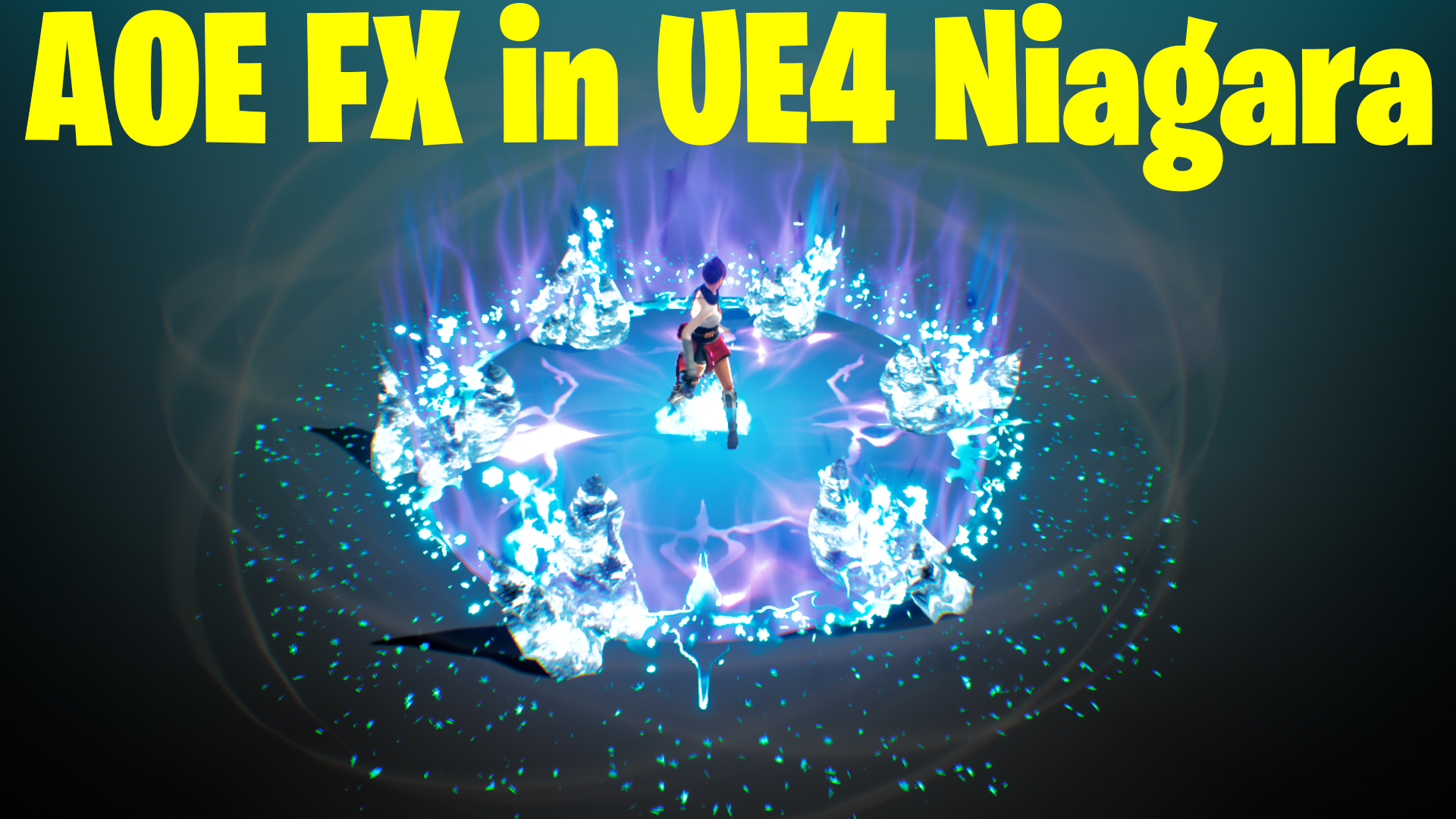
AOE Ice Attack in UE4.27 Niagara Tutorial | Download Files
hi guys today I have created this Aoe ice attack fx in ue4.27 Niagara. this fx has lots of emitters so this tutorial is not from scratch it’s more like a breakdown but I will try my best to show you each and every setting of emitters and material.
#cghow #UE5 #UE4Niagara #gamefx #ue5niagara #ue4vfx #niagara #unrealengineniagara #realtimevfx
●Upload Your Tutorials/Work – https://cghow.com/
Purchase Effect Package From Unreal engine Marketplace –
Unreal Engine Niagara Effects in Marketplace – https://youtu.be/DF4Lb_btEus
Niagara Effects Pack in Marketplace – https://youtu.be/g6_k8T7FqHA
Unreal Engine Advanced Magical Effects in Marketplace – https://youtu.be/0Dn3GLIzhMo
Smoke in UE4 Niagara Pack01 in Unreal Engine Marketplace – https://youtu.be/38BPA_9yqJ8
UE4 Niagara Fire Pack 01 in Marketplace – https://youtu.be/PW5FL-zZoP4
UE4 Niagara Fire Pack 02 in Marketplace – https://youtu.be/fdLXPlUEzxM
UE4 Niagara Explosions Pack 02 in Marketplace – https://youtu.be/dj-XX9he4aE
Unreal Engine Niagara Effects Pack 03 in Marketplace – https://youtu.be/0kKon43I-Og
Slow Motion Explosion in UE4 Niagara Pack 04 in Marketplace – https://youtu.be/lUK1eW5zRP0
Unreal Engine Niagara Effects pack 04 in Marketplace – https://youtu.be/MihWYB31Gi4
Slow Motion Explosion in UE4 Niagara Pack 04 in Marketplace – https://youtu.be/lUK1eW5zRP0
UE4.25 Niagara Effects Pack 05 in Marketplace – https://youtu.be/sn1HIENVTDI
UE4.25 Niagara Effects Pack 06 in Marketplace – https://youtu.be/pvH_xGQ5jvs
Explosions Package in Unreal Engine Niagara Particle System – https://youtu.be/1mbqWscjUJ4
●Follow FB Page – https://www.facebook.com/cghow0/
●Join FB Group – https://www.facebook.com/groups/cghow/
●Android App – http://bit.ly/2XUnhoR
Playlists-
●Unreal Engine Niagara Tutorials – http://bit.ly/2SmPEuT
●Unreal engine VFX Tutorials -http://bit.ly/2JNXyJZ
●Unity VFX Tutorials – http://bit.ly/2XNGlKz
Hi guys, I’m Asif Ali, and you’re watching CGHOW!
In this video, I will show you how I created this Ice Attack effect in Unreal Engine 4.27 using Niagara.
Let’s dive into the tutorial!
[Background Music]
Before we begin, make sure to subscribe to my YouTube channel and click the bell icon so you never miss a new video!
Effect Breakdown:
- Aura Effect:
- Mesh: Cylindrical, slightly conical (bottom smaller than top)
- Material: Basic with noise texture, stretched for rays, multiplied with a gradient for top masking.
- Emitter: Spawns 1 particle with a 0.5 delay, color from blue to white, lifetime 0.5.
- Duplicate Emitters:
- Often, I duplicate emitters multiple times for variation (size, faded, sharp).
- Example: Aura effect with varying sizes like 20x20x100 and 15x15x100.
- Character Glow:
- Uses a radial ramp and custom alignment, random axis to face various directions.
- Color: Light yellow (almost white).
- Burst 50 particles, 0.5 delay, lifetime 0.5, random size.
- Ground Glow:
- Same emitter but custom alignment on the Z axis for glow to face downward.
- Color: Bluish, burst 30 particles with 0.5 delay, large size.
- Spiral Effect:
- Mesh: Spiral mesh created in a 3D modeling tool (e.g., Blender).
- Material: Basic with noise texture and gradient for animation.
- Emitter: 5 particles with 0.6 delay, random size, random rotation on the Z axis.
- Shield Effect:
- Appears bright and then erodes, using a noise texture with a dynamic parameter to animate the erosion.
- Emitter: Spawns 1 particle with a 0.6 delay, size 8, rotates to correct facing, and color transitions from white to blue.
- Fire Effects:
- Material: Noise texture with dynamic tiling to create variation per particle.
- Emitter: Random velocity on the Z axis, color from cyan to purplish blue, randomize tiling for each particle.
- Embers: Duplicate the fire emitter but reduce the size and add random movement.
- Icicles:
- Spawn 6 particles with delay, life 3, size 200, using taurus location to distribute evenly.
- Emitter: Uses dynamic parameter to erode based on the mesh material.
- Fire Rings:
- Mesh: Slender with noise texture.
- Emitter: Spawns 1 particle with 23 size, color change and dynamic parameter to randomize the texture tiling.
- Shape on Ground:
- Uses custom alignment and random color shift to simulate erosion on the ground.
- Color transitions from yellow to black with a size of 3600.
- Snowflakes and Vortex:
- Emitter: Spawns 100 particles with a 3 delay in a torus shape.
- Custom alignment rotates sprites randomly for a 3D effect.
- Uses random size and velocity for natural randomness.
- Black Smoke and Smoke Rings:
- Material: Same as fire but black color.
- Emitter: Spawns 100 particles with a slight outward velocity, rotating in random directions.
- Final Snowflakes and Ground Effects:
- Duplicated snowflakes with varied behaviors like rusting at the end or spreading on the ground with different burst rates.
Conclusion:
I hope you enjoyed watching this breakdown of the Ice Attack effect. I’ve also included the project file for download so you can explore it and create something similar for your own projects!
If you have any questions or feedback, feel free to leave a comment below! Don’t forget to subscribe to my YouTube channel for more tutorials.
Thanks for watching, and keep learning!
Bye!
Leave a Reply