

Download – https://www.patreon.com/posts/56372256
Ref-Twitter-https://bit.ly/3u7tKyR
Ref-Artstation-https://bit.ly/3nPHY6k
👉👉 If you Liked it – http://bit.ly/2UZmiZ4
Channel Ashif – http://bit.ly/3aYaniw
Support me on – https://www.patreon.com/Ashif
Support me on – paypal.me/9953280644
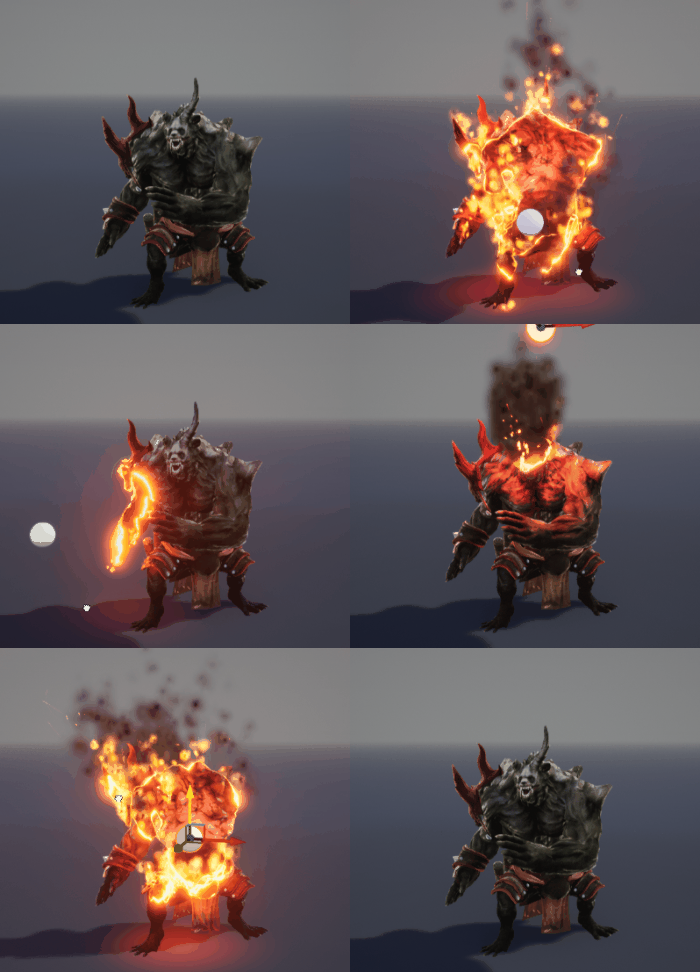
hi, guys today I have created a disintegration particle fx in ue5 Niagara. this is different fx from other disintegration fx created by Niagara. in this particles only spawning from dissolve edges. to create this first I used the same process with Niagara have to use static mesh UV in the dynamic parameter then connect that dynamic parameter in material opacity but that was not helpful for this effect so basically what I did, it took two kill volume sphere with different size and got the edge from their size deffrence that connects that with initial position and got this result.
#cghow #UE5 #UE4Niagara #gamefx #ue5niagara #ue4vfx #niagara #unrealengineniagara #realtimevfx
●Upload Your Tutorials/Work – https://cghow.com/
Purchase Effect Package From Unreal engine Marketplace –
Unreal Engine Niagara Effects in Marketplace – https://youtu.be/DF4Lb_btEus
Niagara Effects Pack in Marketplace – https://youtu.be/g6_k8T7FqHA
Unreal Engine Advanced Magical Effects in Marketplace – https://youtu.be/0Dn3GLIzhMo
Smoke in UE4 Niagara Pack01 in Unreal Engine Marketplace – https://youtu.be/38BPA_9yqJ8
UE4 Niagara Fire Pack 01 in Marketplace – https://youtu.be/PW5FL-zZoP4
UE4 Niagara Fire Pack 02 in Marketplace – https://youtu.be/fdLXPlUEzxM
UE4 Niagara Explosions Pack 02 in Marketplace – https://youtu.be/dj-XX9he4aE
Unreal Engine Niagara Effects Pack 03 in Marketplace – https://youtu.be/0kKon43I-Og
Slow Motion Explosion in UE4 Niagara Pack 04 in Marketplace – https://youtu.be/lUK1eW5zRP0
Unreal Engine Niagara Effects pack 04 in Marketplace – https://youtu.be/MihWYB31Gi4
Slow Motion Explosion in UE4 Niagara Pack 04 in Marketplace – https://youtu.be/lUK1eW5zRP0
UE4.25 Niagara Effects Pack 05 in Marketplace – https://youtu.be/sn1HIENVTDI
UE4.25 Niagara Effects Pack 06 in Marketplace – https://youtu.be/pvH_xGQ5jvs
Explosions Package in Unreal Engine Niagara Particle System – https://youtu.be/1mbqWscjUJ4
●Follow FB Page – https://www.facebook.com/cghow0/
●Join FB Group – https://www.facebook.com/groups/cghow/
●Android App – http://bit.ly/2XUnhoR
Playlists-
●Unreal Engine Niagara Tutorials – http://bit.ly/2SmPEuT
●Unreal engine VFX Tutorials -http://bit.ly/2JNXyJZ
●Unity VFX Tutorials – http://bit.ly/2XNGlKz
Mastering Disintegration Effect in UE5 Niagara
Description:
In this tutorial, Asif Ali from CGHOW demonstrates how to create a stunning disintegration effect in Unreal Engine 5 using Niagara. Learn how particles dynamically emit from the edges of a dissolving material, creating a visually captivating effect. This tutorial walks you through every step, from crafting materials and setting up Niagara particle systems to implementing a sphere mask for precise particle emission. You’ll also discover advanced techniques, like linking material and particle parameters using Material Parameter Collections and creating custom kill volumes for edge-based particle effects.
Key Points Covered:
- Using Sphere Masks in Materials: Learn to create dynamic dissolve effects with glowing edges using sphere masks.
- Niagara Particle Setup: Emit particles from the surface of a dissolving mesh with accurate edge alignment.
- Material Parameter Collections (MPC): Sync material and particle animations for seamless transitions.
- Custom Kill Volume in Niagara: Control particle spawn and movement with a custom kill volume linked to the initial position.
- Dynamic Linking in Blueprints: Use Blueprints to connect particle offsets and material parameters for synchronized animations.
- Advanced Debugging and Optimization: Solve common issues like lingering particles and refine edge-based spawning effects.
Trendy Tags:
#UE5 #Niagara #DisintegrationEffect #VFX #CGHOW #UnrealEngine #GameDevelopment #MaterialParameterCollection #ParticleSystems #NiagaraTutorial
Additional Notes:
- Use models from platforms like Mixamo for experimentation and animations.
- For similar effects, refer to CGHOW’s previous dissolve tutorials.
- Experiment with kill volumes and dynamic parameters to fine-tune your effect.
Suggestions for Future Tutorials:
- Demonstrating similar disintegration effects with different shapes (e.g., cubes or complex meshes).
- Exploring the integration of texture-based particle color mapping for enhanced visuals.
Leave a Reply