

👉👉 If you Liked it – http://bit.ly/2UZmiZ4
Channel Ashif – http://bit.ly/3aYaniw
Support me on – https://www.patreon.com/Ashif
Support me on – paypal.me/9953280644
Disintegration Skeletal Mesh FX in U5 Niagara Tutorial | Download Files
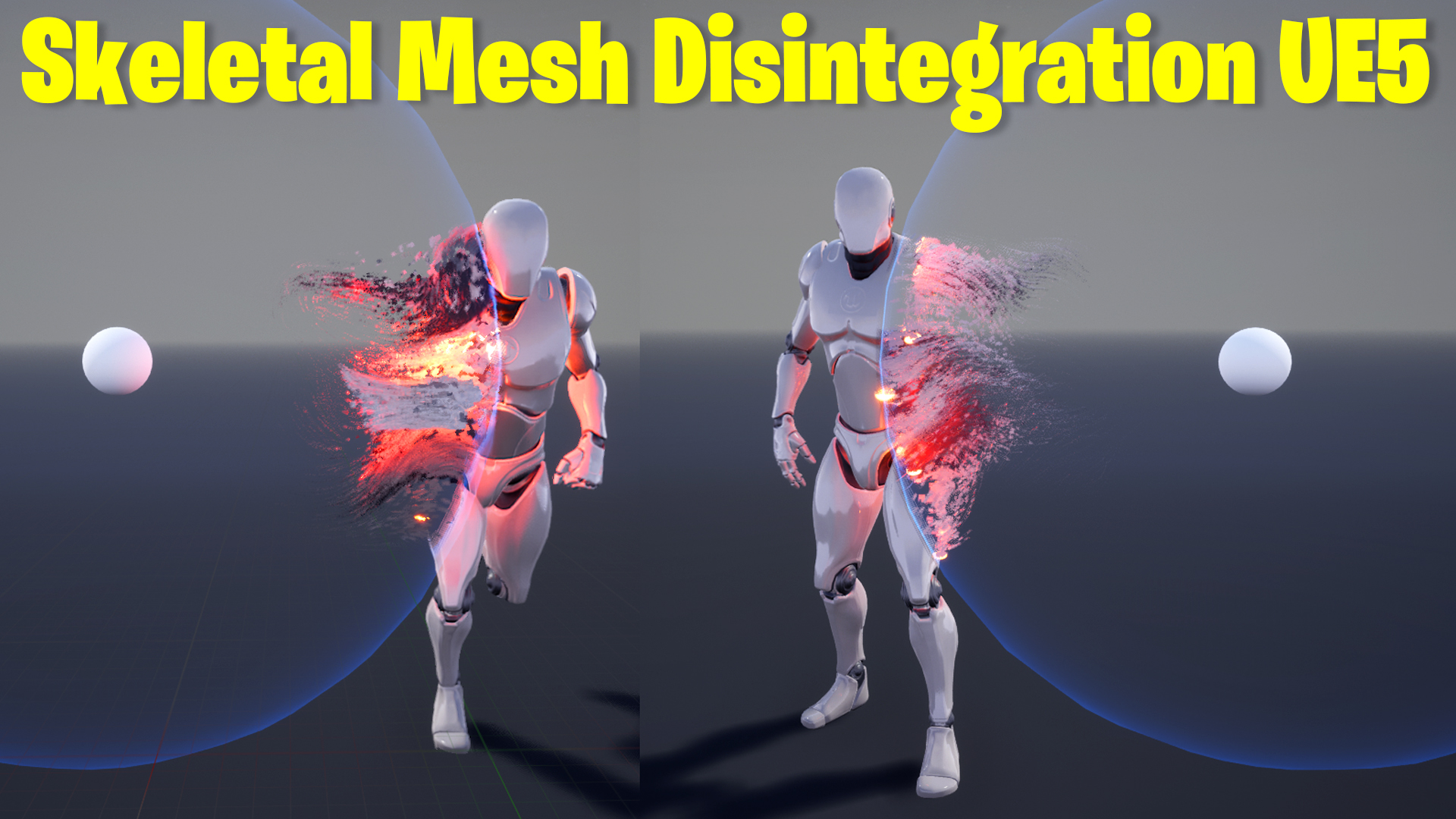
in this tutorial used the same tick for disintegrating particles using the kill volume sphere. but this time I used skeletal mesh and to spawn particles on mesh I used sprite reproduction modules.
#cghow #UE5 #UE4Niagara #gamefx #ue5niagara #ue4vfx #niagara #unrealengineniagara #realtimevfx
●Upload Your Tutorials/Work – https://cghow.com/
Purchase Effect Package From Unreal engine Marketplace –
Unreal Engine Niagara Effects in Marketplace – https://youtu.be/DF4Lb_btEus
Niagara Effects Pack in Marketplace – https://youtu.be/g6_k8T7FqHA
Unreal Engine Advanced Magical Effects in Marketplace – https://youtu.be/0Dn3GLIzhMo
Smoke in UE4 Niagara Pack01 in Unreal Engine Marketplace – https://youtu.be/38BPA_9yqJ8
UE4 Niagara Fire Pack 01 in Marketplace – https://youtu.be/PW5FL-zZoP4
UE4 Niagara Fire Pack 02 in Marketplace – https://youtu.be/fdLXPlUEzxM
UE4 Niagara Explosions Pack 02 in Marketplace – https://youtu.be/dj-XX9he4aE
Unreal Engine Niagara Effects Pack 03 in Marketplace – https://youtu.be/0kKon43I-Og
Slow Motion Explosion in UE4 Niagara Pack 04 in Marketplace – https://youtu.be/lUK1eW5zRP0
Unreal Engine Niagara Effects pack 04 in Marketplace – https://youtu.be/MihWYB31Gi4
Slow Motion Explosion in UE4 Niagara Pack 04 in Marketplace – https://youtu.be/lUK1eW5zRP0
UE4.25 Niagara Effects Pack 05 in Marketplace – https://youtu.be/sn1HIENVTDI
UE4.25 Niagara Effects Pack 06 in Marketplace – https://youtu.be/pvH_xGQ5jvs
Explosions Package in Unreal Engine Niagara Particle System – https://youtu.be/1mbqWscjUJ4
●Follow FB Page – https://www.facebook.com/cghow0/
●Join FB Group – https://www.facebook.com/groups/cghow/
●Android App – http://bit.ly/2XUnhoR
Playlists-
●Unreal Engine Niagara Tutorials – http://bit.ly/2SmPEuT
●Unreal engine VFX Tutorials -http://bit.ly/2JNXyJZ
●Unity VFX Tutorials – http://bit.ly/2XNGlKz
Description
In this tutorial, I demonstrate how to create a distance dissolve effect on an animated skeleton mesh in Unreal Engine 5 using Niagara particle systems. Learn how to make particles emit precisely from the edges of your animated mesh and synchronize them with skeletal animations. This tutorial builds on the static mesh dissolve effect shared in my previous video and introduces exciting new techniques for skeleton meshes.
Key Points
- Create and link Niagara particle systems with animated skeleton meshes.
- Synchronize particles with skeletal animations using Niagara modules like Initial Mesh Reproduction Sprite and Mesh Update.
- Incorporate curl noise forces and point attractors for dynamic particle behavior.
- Animate material dissolve effects using sphere masks.
- Customize edge spawning effects by manipulating user parameters.
- Blueprint integration for interactive particle and material control.
Step-by-Step Guide
- Setup the Skeleton Mesh
- Import your skeleton mesh and apply animations like “walk” or “idle.”
- Ensure the material includes sphere mask parameters for dissolve effects.
- Create the Particle System
- Use GPU particles for handling higher spawn rates.
- Add the Initial Mesh Reproduction Sprite and Mesh Update modules to make particles emit and stick to the mesh surface.
- Enable Dynamic Forces
- Integrate curl noise and point attractors to enhance the visual appeal.
- Fix curl noise issues by using Lerp and linking it to mesh position and velocity.
- Animate Dissolve Effect
- Link sphere mask parameters in the material to a blueprint for dynamic control.
- Use Niagara’s Scratch Module Editor to create and customize initial particle positions.
- Blueprint Integration
- Set up user parameters for radius and position in the blueprint to control dissolve and edge effects interactively.
- Enhance Visuals
- Adjust particle behaviors and forces for a polished look.
- Ensure the dissolve effect matches both the material and particle systems.
Tags
- Unreal Engine 5
- Niagara VFX
- Skeleton Mesh Animation
- Distance Dissolve Effect
- Gaming VFX
- Blueprint Integration
Additional Notes
- Download the project file on Patreon for easy reference and experimentation.
- Watch the previous tutorial to learn about static mesh dissolve effects for better context.
- Experiment with different forces, animations, and parameters to create unique effects tailored to your game project.
If you enjoyed this tutorial, don’t forget to subscribe to my YouTube channel CGHOW and turn on notifications to stay updated with more amazing VFX tips and tricks. 😊
Leave a Reply