


Download – https://youtu.be/jAGMPOV_Bbg
👉👉 If you Liked it – http://bit.ly/2UZmiZ4
Channel Ashif – http://bit.ly/3aYaniw
Support me on – https://www.patreon.com/Ashif
Support me on – paypal.me/9953280644
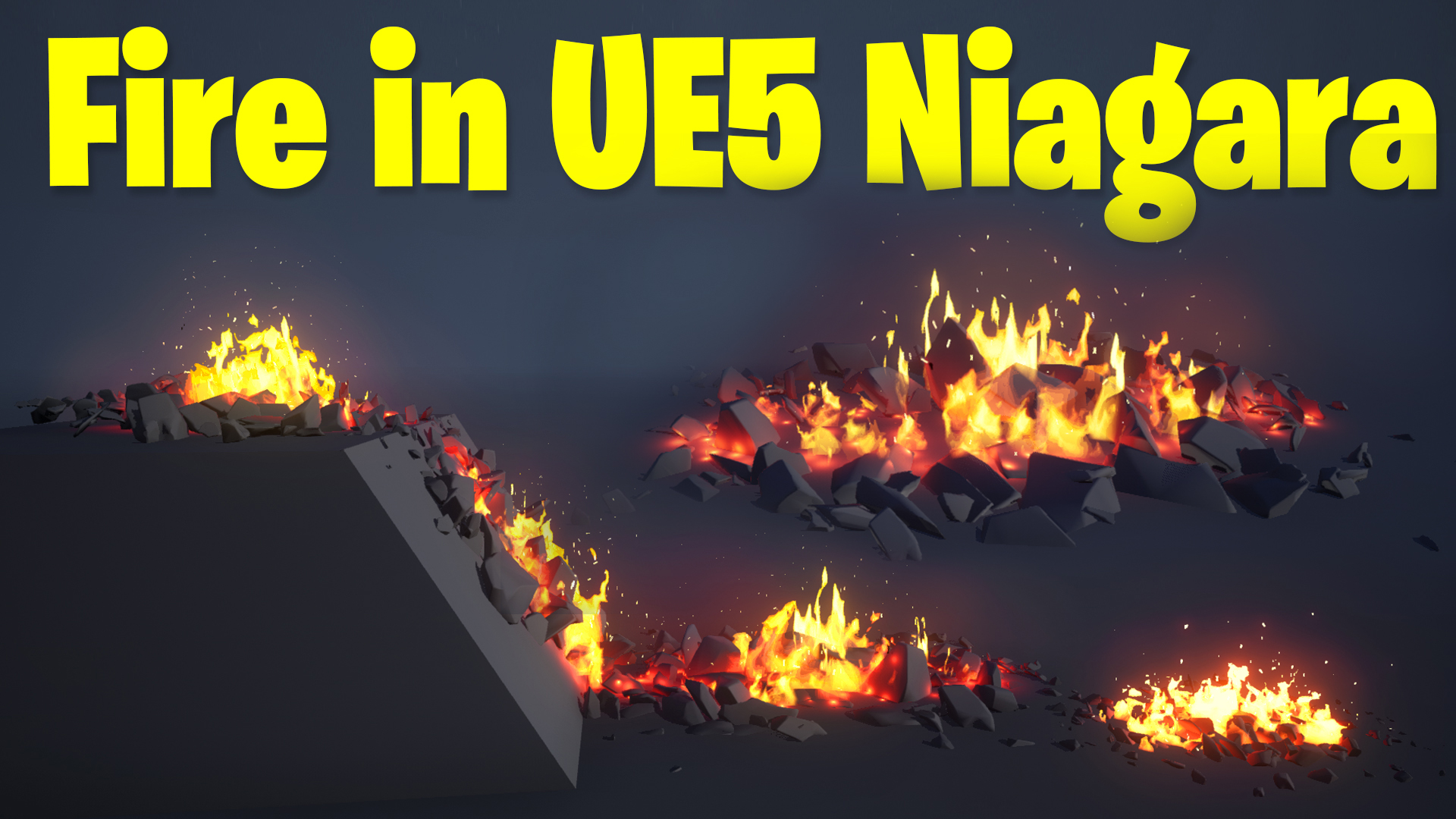
Fire in UE5 Niagara Tutorial | Download Files
hi, today I have created a simple fire effect with some rocks scattered in ue5 niagara. this is a step by step tutorial so you will learn how I created material for fire also.
#cghow #UE5 #UE4Niagara #gamefx #ue5niagara #ue4vfx #niagara #unrealengineniagara #realtimevfx
●Upload Your Tutorials/Work – https://cghow.com/
Purchase Effect Package From Unreal engine Marketplace –
Unreal Engine Niagara Effects in Marketplace – https://youtu.be/DF4Lb_btEus
Niagara Effects Pack in Marketplace – https://youtu.be/g6_k8T7FqHA
Unreal Engine Advanced Magical Effects in Marketplace – https://youtu.be/0Dn3GLIzhMo
Smoke in UE4 Niagara Pack01 in Unreal Engine Marketplace – https://youtu.be/38BPA_9yqJ8
UE4 Niagara Fire Pack 01 in Marketplace – https://youtu.be/PW5FL-zZoP4
UE4 Niagara Fire Pack 02 in Marketplace – https://youtu.be/fdLXPlUEzxM
UE4 Niagara Explosions Pack 02 in Marketplace – https://youtu.be/dj-XX9he4aE
Unreal Engine Niagara Effects Pack 03 in Marketplace – https://youtu.be/0kKon43I-Og
Slow Motion Explosion in UE4 Niagara Pack 04 in Marketplace – https://youtu.be/lUK1eW5zRP0
Unreal Engine Niagara Effects pack 04 in Marketplace – https://youtu.be/MihWYB31Gi4
Slow Motion Explosion in UE4 Niagara Pack 04 in Marketplace – https://youtu.be/lUK1eW5zRP0
UE4.25 Niagara Effects Pack 05 in Marketplace – https://youtu.be/sn1HIENVTDI
UE4.25 Niagara Effects Pack 06 in Marketplace – https://youtu.be/pvH_xGQ5jvs
Explosions Package in Unreal Engine Niagara Particle System – https://youtu.be/1mbqWscjUJ4
●Follow FB Page – https://www.facebook.com/cghow0/
●Join FB Group – https://www.facebook.com/groups/cghow/
●Android App – http://bit.ly/2XUnhoR
Playlists-
●Unreal Engine Niagara Tutorials – http://bit.ly/2SmPEuT
●Unreal engine VFX Tutorials -http://bit.ly/2JNXyJZ
●Unity VFX Tutorials – http://bit.ly/2XNGlKz
Creating a Simple Fire Effect and Scattered Rocks in UE5 Niagara
In this tutorial, I walk you through creating a simple fire effect in Unreal Engine 5 Niagara along with scattered rocks around the fire. This effect was inspired by a viewer request. Let’s dive in! 🚀
Key Steps in the Tutorial
- Setting Up the Rocks:
- Use three debris meshes to create scattered rocks.
- Spawn rocks using a box location module and adjust randomness through:
- Mesh Index Binding for randomizing between the three meshes.
- Randomization of size and rotation to add variation.
- Implement scaling down of rocks near edges using distance-based scaling.
- Adding Fire to Rocks:
- Created a material for the fire using noise textures, radial gradients, and distortions for a stylized flame look.
- Used dynamic parameters for:
- Randomizing flame tiling and erosion.
- Adjusting speed and glow for varied fire animations.
- Set up multiple emitters:
- Base fire: Randomized life, spawn rates, and texture animations.
- Secondary fire: Smaller and more dynamic flames rising higher.
- Enhancing the Effect:
- Added embers and sparks:
- Used a square-shaped additive material with a randomized velocity for sparks.
- Controlled size, lifespan, and behavior with curl noise and velocity adjustments.
- Integrated a subtle glow effect:
- Used a radial gradient material with controlled alpha and scaling for a soft glow.
- Added embers and sparks:
- Breaking the Box Shape of Rocks:
- Reduced uniformity by duplicating the particle system and adjusting:
- Spawn rates.
- Locations for added randomness.
- Reduced uniformity by duplicating the particle system and adjusting:
Key Features of the Fire Material
- Dynamic Noise and Erosion:
- The noise texture was distorted twice to enhance the randomness and flow of the fire.
- Erosion values were animated to fade the fire in and out naturally.
- Stylization:
- A combination of multiply, floor, and saturation nodes was used to achieve the desired stylized appearance.
Final Setup
- Rocks and fire were assembled together, using distance scaling and randomized particle behaviors to create a natural, realistic look.
- Added glows and embers for a visually complete firepit effect.
Trendy Tags
- #UnrealEngine5
- #NiagaraVFX
- #GameDevelopment
- #FireEffect
- #VFXTutorial
- #StylizedEffects
Additional Notes
- All materials and Niagara systems created during the tutorial are optimized for real-time rendering in games.
- You can download the final project files from my Patreon to explore and customize them for your own projects.
If you enjoyed this tutorial or have any questions, feel free to leave a comment on the video. Don’t forget to subscribe to my channel CGHOW and hit the bell icon for notifications on future tutorials!
Thanks for watching, keep learning, and see you in the next video! 👋
Leave a Reply