

Download – https://www.patreon.com/posts/54924069
👉👉 If you Liked it – http://bit.ly/2UZmiZ4
Channel Ashif – http://bit.ly/3aYaniw
Support me on – https://www.patreon.com/Ashif
Support me on – paypal.me/9953280644
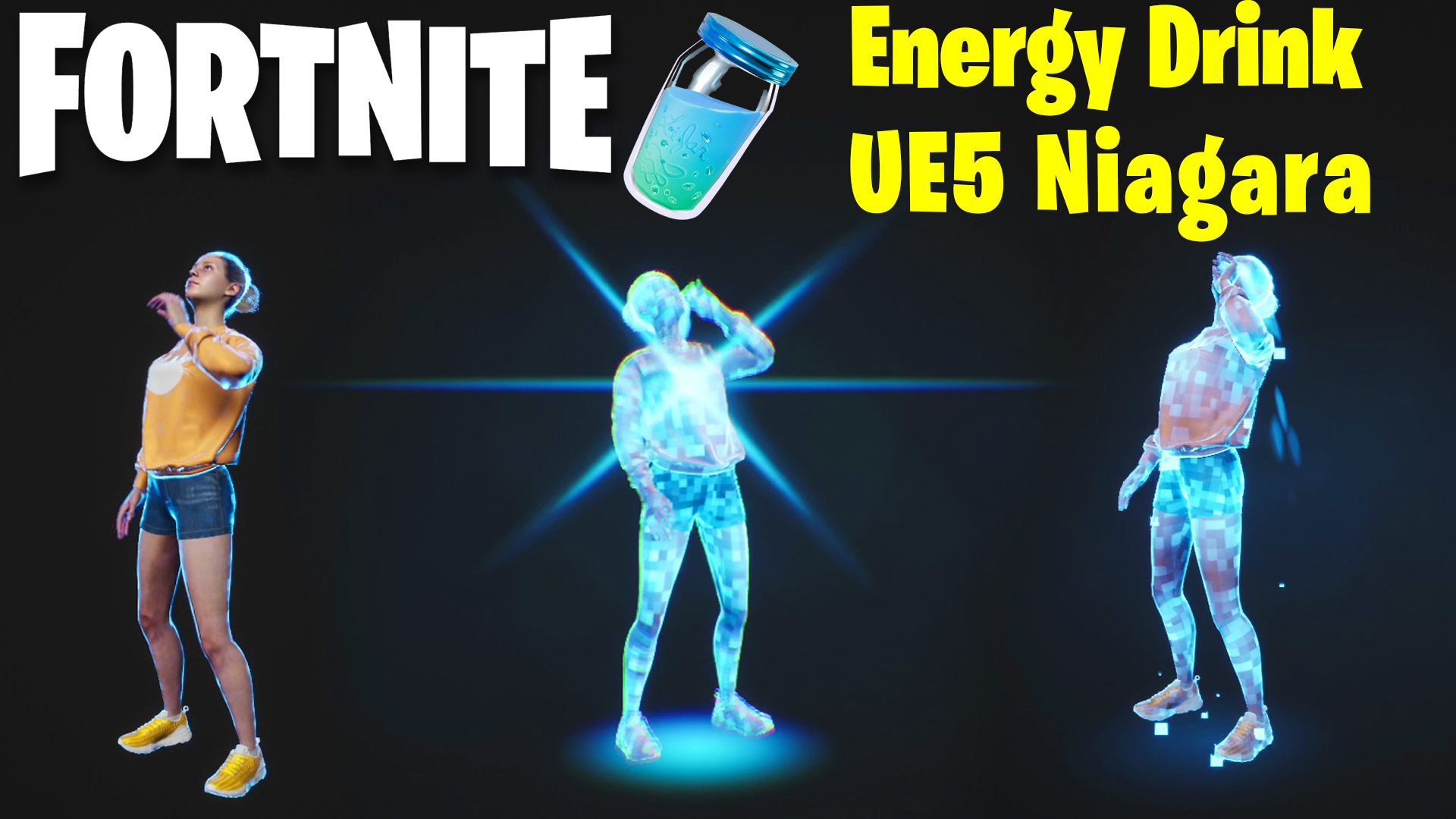
hi guys this is also a requested tutorial. one of my subscribers asked to create Fortnite energy drink fx in ue5 niagara. so I created.
Fortnite Energy Drink FX in UE5 Niagara | Download Files
#cghow #UE5 #UE4Niagara #gamefx #ue4vfx #ue4fx #niagara #ue4niagara #unrealengineniagara #unrealenginevfxtutorials
●Upload Your Tutorials/Work – https://cghow.com/
Purchase Effect Package From Unreal engine Marketplace –
Unreal Engine Niagara Effects in Marketplace – https://youtu.be/DF4Lb_btEus
Niagara Effects Pack in Marketplace – https://youtu.be/g6_k8T7FqHA
Unreal Engine Advanced Magical Effects in Marketplace – https://youtu.be/0Dn3GLIzhMo
Smoke in UE4 Niagara Pack01 in Unreal Engine Marketplace – https://youtu.be/38BPA_9yqJ8
UE4 Niagara Fire Pack 01 in Marketplace – https://youtu.be/PW5FL-zZoP4
UE4 Niagara Fire Pack 02 in Marketplace – https://youtu.be/fdLXPlUEzxM
UE4 Niagara Explosions Pack 02 in Marketplace – https://youtu.be/dj-XX9he4aE
Unreal Engine Niagara Effects Pack 03 in Marketplace – https://youtu.be/0kKon43I-Og
Slow Motion Explosion in UE4 Niagara Pack 04 in Marketplace – https://youtu.be/lUK1eW5zRP0
Unreal Engine Niagara Effects pack 04 in Marketplace – https://youtu.be/MihWYB31Gi4
Slow Motion Explosion in UE4 Niagara Pack 04 in Marketplace – https://youtu.be/lUK1eW5zRP0
UE4.25 Niagara Effects Pack 05 in Marketplace – https://youtu.be/sn1HIENVTDI
UE4.25 Niagara Effects Pack 06 in Marketplace – https://youtu.be/pvH_xGQ5jvs
Explosions Package in Unreal Engine Niagara Particle System – https://youtu.be/1mbqWscjUJ4
●Follow FB Page – https://www.facebook.com/cghow0/
●Join FB Group – https://www.facebook.com/groups/cghow/
●Android App – http://bit.ly/2XUnhoR
Playlists-
●Unreal Engine Niagara Tutorials – http://bit.ly/2SmPEuT
●Unreal engine VFX Tutorials -http://bit.ly/2JNXyJZ
●Unity VFX Tutorials – http://bit.ly/2XNGlKz
Tutorial Title: Fortnite-Inspired Energy Drink Effect in Unreal Engine 5
Introduction:
- Hi guys, I’m Asif Ali, and you’re watching CGHOW. In today’s tutorial, we’ll be creating an effect similar to the energy drink animation from Fortnite, where a player drinks energy and body material effects appear. This was requested by one of my subscribers, and I’m excited to show you how to recreate this effect in Unreal Engine 5.
Step-by-Step Breakdown:
- Overview of the Effect:
- The effect involves the character drinking the energy drink, followed by a flash and flare, a body material effect on the character, and a glowing ring on the ground. The body material dissolves gradually.
- This effect was inspired by an animation from an example character, and I used it as a reference.
- Creating the Liquid Particles:
- The first particle system represents the liquid falling with gravity, using basic particle parameters like velocity and a conical shape.
- The second system handles the flash and glow effects:
- Flash: Burst one particle with a blue color and size of 300, rotating with random values for visual randomness.
- Flare: Duplicate the flash emitter and change the material for a radial glow effect.
- Ring Effect: A ring is created by subtracting smaller from larger rings, with noise applied to make it dynamic.
- Ground Glow:
- The glow on the ground is created using a radial material, with particles fading in and out, aligned to the Z-axis for consistency.
- Body Material Effect:
- The body material changes when the character drinks the energy drink.
- Material Setup:
- A noise texture is used, which is tiled and multiplied to create contrast.
- The character’s body is then assigned this dynamic material, along with additional detail on the edges using a fresnel effect for a glowing outline.
- Strips are added to the character’s body using a local position mask to create a unique glowing strip effect.
- The material erodes over time, controlled by parameters.
- Animating with Material Parameters:
- Material Parameter Collection (MPC) is used to control the material properties like body glow, dissolving, and edge effect.
- These parameters are animated in the Sequencer, syncing with the flash, liquid, and body material changes.
- Final Adjustments:
- The material can be darkened to enhance visibility, especially when the effect activates.
- The effect is animated and linked to the character’s specific body part for precise control.
Conclusion:
- This effect can be easily adapted to other characters or materials, and you can experiment with different parameters to customize the appearance.
- Thanks for suggesting this effect—your feedback helps me create tutorials that are relevant to what you want to learn.
Call to Action:
- If you enjoyed this tutorial, please subscribe to my channel and click the bell icon for new video notifications. You can also download this effect from my Patreon page to try it out in your own projects.
Leave a Reply