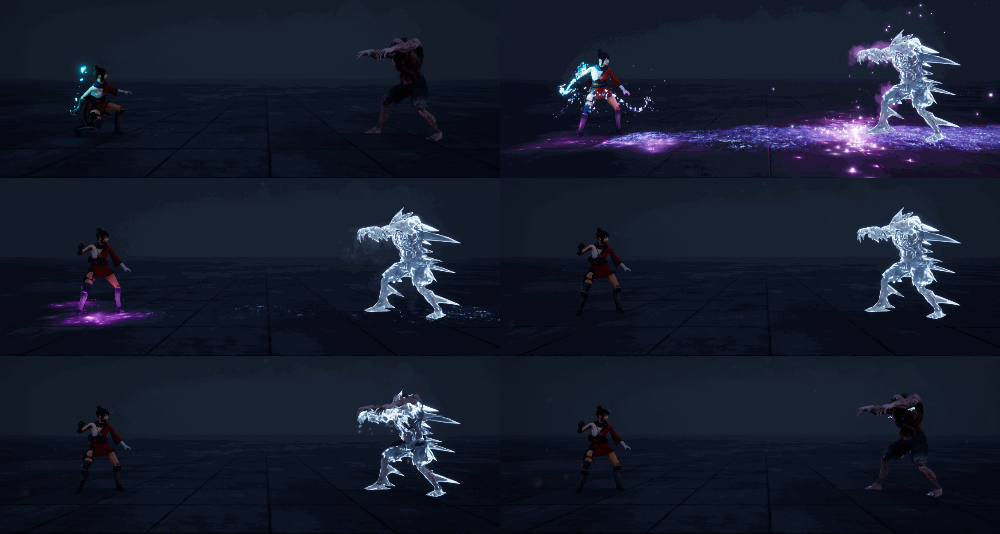
In this tutorial you will learn how to create Ice Hit Effect in unreal engine. you will learn every step for this effect texture, materials, mesh and emitters. For any concern comment below the video or create help thread in CGHOW form (discussion & help forum link below)
Creating the Eyes Hit Effect in Unreal Engine | VFX Tutorial
Hello everyone! I’m Asif Ali, and welcome to my channel. In today’s tutorial, we’ll be creating this Eyes Hit Effect, where a girl hits a zombie, transforming it into eyes and making it melt as the eyes fall down. Let’s dive into how I achieved this effect step by step.
Effect Breakdown:
Inspiration and Concept:
The effect starts with a girl hitting a zombie, which then transforms into eyes. After that, the zombie melts, and the eyes fall to the ground. This creates a striking visual of transformation and decay.
Particle Systems Overview:
I used several particle systems to achieve the various stages of the effect:
Hand Particle System: The hand particles are connected to the girl’s hand and are triggered when she hits the zombie.
Eyes Effect: The zombie transforms into eyes, which melt and drip down.
Shooting Particles: These represent the girl shooting at the zombie, creating sparks upon impact.
Smoke and Dripping Particles: As the zombie melts, smoke and dripping particles appear to emphasize the decay.
Detailed Breakdown:
Hand Particles:
The hand particle system is attached to the girl’s hand.
Emitter Settings:
Sparks are created with a spawn rate of 300 and a very low velocity on the Z-axis.
I used Curl Noise for random movement of the sparks, making them appear more natural.
The particles interact with the ground, thanks to collision settings.
Shooting Particles:
The shooting particles represent the sparks as the girl hits the zombie.
Emitter Settings:
The particles spawn in a rectangular shape using a custom box location.
I applied a dynamic parameter to control the eroding effect, which makes the sparks disappear as they hit the target.
Eyes Effect:
The zombie starts with a normal texture and then transforms into a zombie with ice textures.
Transition Effect:
The transformation is controlled through a dynamic parameter, gradually eroding the zombie mesh into the eyes.
The opacity and material properties change using noise and world position offset, creating a melting effect on the zombie’s eyes.
Smoke and Dripping Particles:
Smoke Effect: I used a default smoke material with sub UV animation.
Dripping Effect: I added dripping particles falling from the melting zombie, with a delayed spawn to emphasize the decay.
Collision and Lighting:
Particles are set to collide with the ground and other surfaces, creating a realistic effect.
Lights are applied to the particles, adding a glow as they hit the ground or the character.
Customization Tips:
You can customize this effect by:
Adjusting the particle size and spawn rate to control the intensity of the sparks.
Changing the color transitions of the sparks or smoke for different themes.
Modifying the material properties of the eyes effect to create variations in the zombie’s transformation.
Final Thoughts:
This Eyes Hit Effect is a great example of how to combine multiple particle systems and materials to create a dynamic and visually striking VFX sequence in Unreal Engine. I hope this tutorial helps you create something awesome for your own projects.
Don’t forget to:
Like, share, and subscribe to my channel
Hit the bell icon for notifications on new tutorials
Support me on Patreon (link in the description)
Thanks for watching, and keep learning! — Asif Ali
I am Ashif Ali, Real-Time VFX Artist, I make Unreal Engine Niagara Tutorial on this channel. I've made it my mission to share my knowledge and expertise with the world through my YouTube channel. So why not join me on this exciting adventure? Follow me on my social links, subscribe to my channel, and support my growth as a creator. Together, we can create amazing things and take our skills to new heights. And who knows, you might even get access to some of my exclusive files for free!