

Support me on – https://www.patreon.com/Ashif
Support me on – paypal.me/9953280644
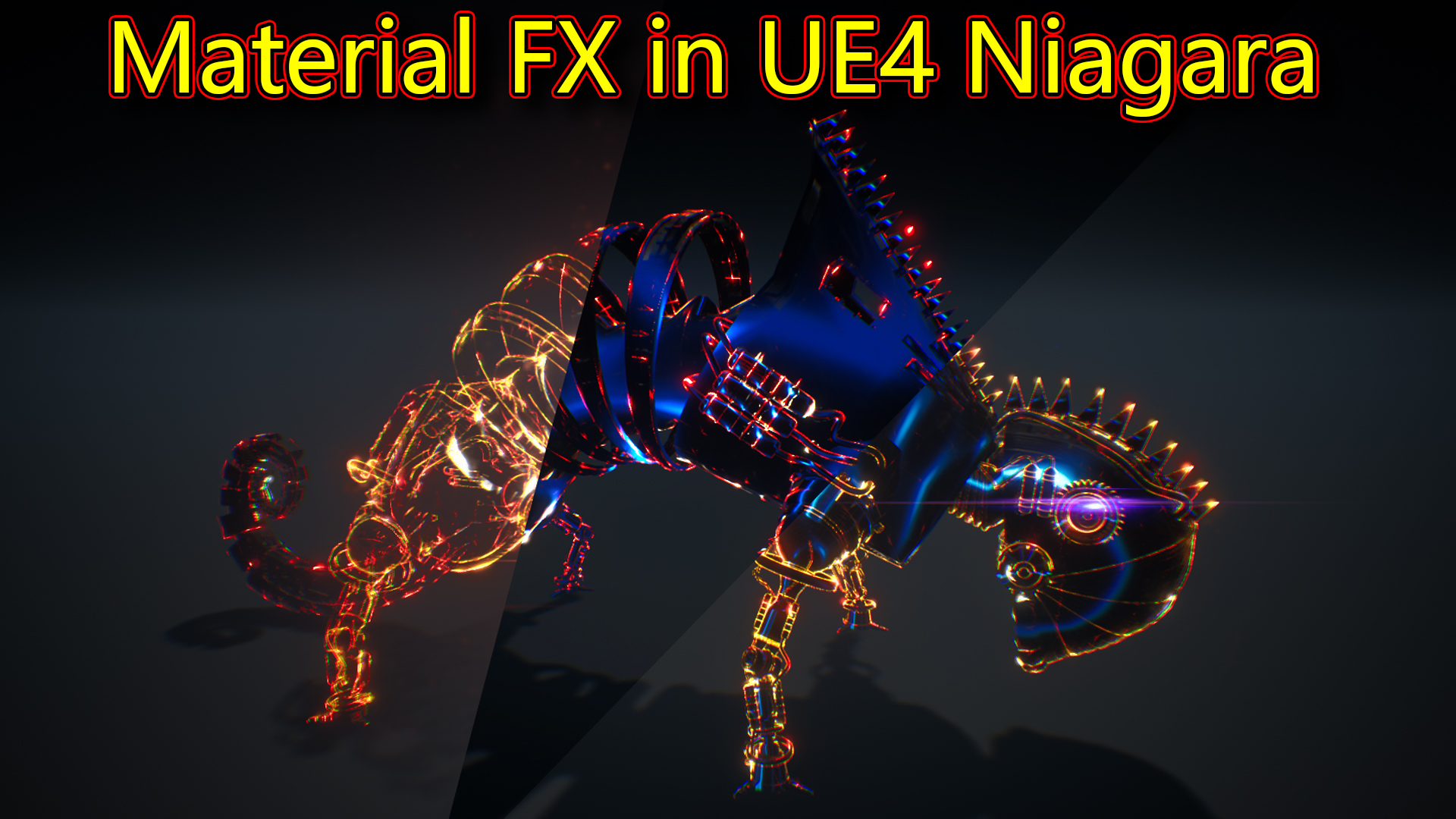
hi, guys today I have created this material fx on lizard mesh in unreal engine Niagara.
#cghow #RealtimeVFX #UE4Niagara #gamefx #ue4vfx #ue4fx #niagara #unrealengineniagara #unrealenginevfxtutorials
●Upload Your Tutorials/Work – https://cghow.com/
Purchase Effect Package From Unreal engine Marketplace –
Unreal Engine Niagara Effects in Marketplace – https://youtu.be/DF4Lb_btEus
Niagara Effects Pack in Marketplace – https://youtu.be/g6_k8T7FqHA
Unreal Engine Advanced Magical Effects in Marketplace – https://youtu.be/0Dn3GLIzhMo
Smoke in UE4 Niagara Pack01 in Unreal Engine Marketplace – https://youtu.be/38BPA_9yqJ8
UE4 Niagara Fire Pack 01 in Marketplace – https://youtu.be/PW5FL-zZoP4
UE4 Niagara Fire Pack 02 in Marketplace – https://youtu.be/fdLXPlUEzxM
UE4 Niagara Explosions Pack 02 in Marketplace – https://youtu.be/dj-XX9he4aE
Unreal Engine Niagara Effects Pack 03 in Marketplace – https://youtu.be/0kKon43I-Og
Slow Motion Explosion in UE4 Niagara Pack 04 in Marketplace – https://youtu.be/lUK1eW5zRP0
Unreal Engine Niagara Effects pack 04 in Marketplace – https://youtu.be/MihWYB31Gi4
Slow Motion Explosion in UE4 Niagara Pack 04 in Marketplace – https://youtu.be/lUK1eW5zRP0
UE4.25 Niagara Effects Pack 05 in Marketplace – https://youtu.be/sn1HIENVTDI
UE4.25 Niagara Effects Pack 06 in Marketplace – https://youtu.be/pvH_xGQ5jvs
Explosions Package in Unreal Engine Niagara Particle System – https://youtu.be/1mbqWscjUJ4
●Follow FB Page – https://www.facebook.com/cghow0/
●Join FB Group – https://www.facebook.com/groups/cghow/
●Android App – http://bit.ly/2XUnhoR
Playlists-
●Unreal Engine Niagara Tutorials – http://bit.ly/2SmPEuT
●Unreal engine VFX Tutorials -http://bit.ly/2JNXyJZ
●Unity VFX Tutorials – http://bit.ly/2XNGlKz


Title: Stunning Material Effect on Lizard Mesh in Unreal Engine – Full Tutorial
Description:
Hi everyone, I’m Asif Ali, and you’re watching CGHOW! In today’s video, I’ll show you how I created this amazing material effect on a lizard mesh in Unreal Engine. Although it’s all material-based, I combined the layers using Niagara to bring this unique effect to life. Let’s check out how I made this!
Video Summary:
In this tutorial, I break down how I created a material effect applied to a lizard mesh using Niagara for layering different effects. The final result is a visually stunning animation that transitions through various material layers like wireframe, shine, and dynamic textures.
Here’s how I created the effect:
- The Lizard Mesh:
- The lizard mesh was something I modeled years ago during my student days, but I found it on an old hard disk and decided to use it for this project.
- The effect features seven layers of materials, which are combined within the Niagara particle system.
- Wireframe Layer:
- The first layer is a wireframe material. It uses a simple mesh material with a wireframe effect. By using noise textures, I animated the appearance and disappearance of the wireframe using dynamic parameters.
- Finale Layer:
- This layer is animated with a noise texture that erodes the material, and I applied a blue color to it. The noise is panned using a time parameter, creating a continuous eroding effect.
- Tank Layer:
- This effect was originally made for a tank model, but I adapted it for the lizard. The material erodes based on local position, using a gradient and a masking technique that animates between black and white to create a smooth transition.
- Shine Layer:
- A shine effect was applied to the edges of the lizard. This was done using a noise texture that is panned and multiplied to give a shiny, glowing effect along the edges.
- Wireframe (Red):
- A second wireframe layer is added with a red color, again using noise panning to animate the edges of the lizard.
- Lens Flare Effect:
- The final layer is a lens flare that appears on the mesh. Using the static mesh location, I spawned the flare with a sine wave scaling effect, transitioning the color from yellow to blue for added visual appeal.
Key Learning Points:
- Layering Materials in Unreal Engine using Niagara for complex effects.
- Creating wireframe, shine, and erode effects using noise textures and dynamic parameters.
- Animating materials with panning and masking techniques for smooth transitions.
- Using lens flare for additional emphasis on the model.
- Compositing multiple layers to create an intricate material effect.
Don’t forget to:
- Subscribe to CGHOW for more Unreal Engine tutorials!
- Click the bell icon to get notified of all future videos.
- Leave a comment if you have any questions or suggestions for future tutorials.
Thanks for watching, and remember: Keep learning and experimenting with Unreal Engine!
Music Credits:
[Add Music Credits Here if applicable]
Tags:
Unreal Engine, Material Effect, Niagara VFX, Lizard Mesh, Particle System, 3D VFX, Game Development, Material Layering, Erode Effect, Wireframe, Lens Flare, Unreal Engine Tutorial
Leave a Reply