

Download – https://cghow.gumroad.com/l/wnehm
Download – https://artstn.co/m/8gKeP
Ref – https://bit.ly/3OCfUxw
Credit of concept to Vladyslav Horobets – https://hovl.artstation.com/
NFT – https://opensea.io/CGHOW
Twitter – https://twitter.com/cghow_
👉👉 If you Liked it – http://bit.ly/2UZmiZ4
Channel Ashif – http://bit.ly/3aYaniw
Support me on – https://www.patreon.com/Ashif
Support me on – paypal.me/9953280644
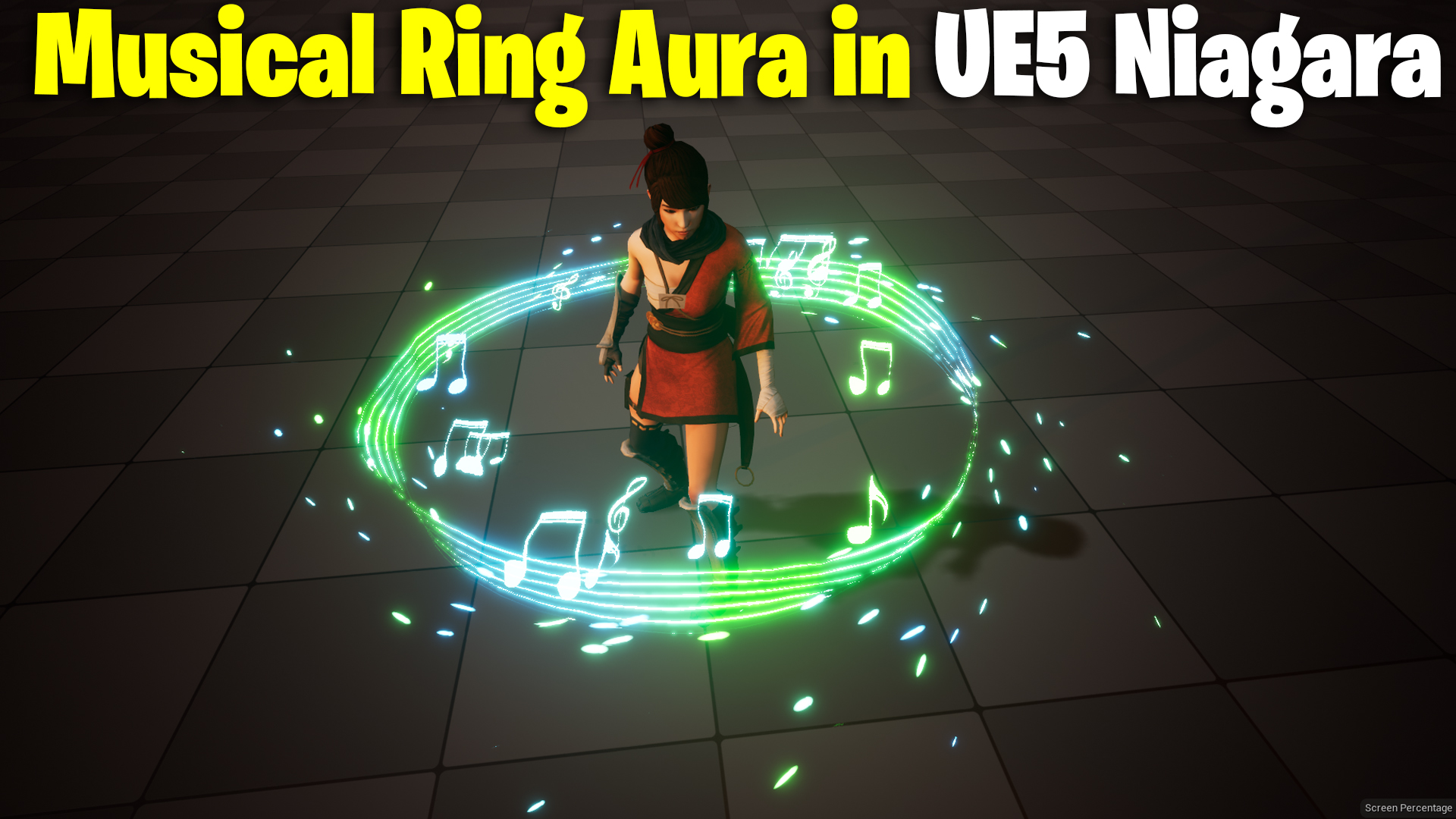
Musical Aura Ring in UE5 Niagara Tutorial | Download Files
Chapters:
0:00 – Intro
1:15 – Create Level
2:35 – Strips Ring Material
7:46 – Strips Ring Emitter
22:43 – Music Signs Material
23:25 – Music Signs Ring Emitter
28:47 – Sparks Emitter
34:07 – Post Process
#cghow #UE5 #UE4Niagara #gamefx #ue5niagara #ue4vfx #niagara #unrealengineniagara #realtimevfx
●Upload Your Tutorials/Work – https://cghow.com/
Purchase Effect Package From Unreal engine Marketplace –
Unreal Engine Niagara Effects in Marketplace – https://youtu.be/DF4Lb_btEus
Niagara Effects Pack in Marketplace – https://youtu.be/g6_k8T7FqHA
Unreal Engine Advanced Magical Effects in Marketplace – https://youtu.be/0Dn3GLIzhMo
Smoke in UE4 Niagara Pack01 in Unreal Engine Marketplace – https://youtu.be/38BPA_9yqJ8
UE4 Niagara Fire Pack 01 in Marketplace – https://youtu.be/PW5FL-zZoP4
UE4 Niagara Fire Pack 02 in Marketplace – https://youtu.be/fdLXPlUEzxM
UE4 Niagara Explosions Pack 02 in Marketplace – https://youtu.be/dj-XX9he4aE
Unreal Engine Niagara Effects Pack 03 in Marketplace – https://youtu.be/0kKon43I-Og
Slow Motion Explosion in UE4 Niagara Pack 04 in Marketplace – https://youtu.be/lUK1eW5zRP0
Unreal Engine Niagara Effects pack 04 in Marketplace – https://youtu.be/MihWYB31Gi4
Slow Motion Explosion in UE4 Niagara Pack 04 in Marketplace – https://youtu.be/lUK1eW5zRP0
UE4.25 Niagara Effects Pack 05 in Marketplace – https://youtu.be/sn1HIENVTDI
UE4.25 Niagara Effects Pack 06 in Marketplace – https://youtu.be/pvH_xGQ5jvs
Explosions Package in Unreal Engine Niagara Particle System – https://youtu.be/1mbqWscjUJ4
●Follow FB Page – https://www.facebook.com/cghow0/
●Join FB Group – https://www.facebook.com/groups/cghow/
●Android App – http://bit.ly/2XUnhoR
Playlists-
●Unreal Engine Niagara Tutorials – http://bit.ly/2SmPEuT
●Unreal engine VFX Tutorials -http://bit.ly/2JNXyJZ
●Unity VFX Tutorials – http://bit.ly/2XNGlKz
Title: Create a Musical Ring Effect in UE5 Niagara
Introduction:
- Hi guys, I’m Ashif Ali and you’re watching CGHOW. Today, I created this musical ring effect in UE5 Niagara. If you haven’t subscribed to my channel yet, please do so. Like, share, and comment if you enjoy the video!
Tutorial Breakdown:
- Reference: I found a reference on ArtStation—12 beautiful auras created by Flat Slave. These can be purchased on the Unity Asset Store.
- Setting Up:
- Create a map in UE5 and set up lighting and scale adjustments.
- Create a base ring by selecting a cylinder mesh (without top and bottom caps) and apply a material to it. Add some gradient and adjust opacity to create white lines on the mesh.
- Set the lines’ parameters to have 7 total lines and adjust the width.
- Niagara Setup:
- Create a Niagara system to use the ring mesh and material.
- Adjust the size, brightness, and other parameters to position the ring around the character (a girl in this case).
- Material Adjustments:
- Apply a noise texture to make the ring appear more dynamic and add wobbling effects to the lines.
- Use dynamic parameters for tiling and pan speed adjustments.
- Adjust the colors and opacity to make the effect more visually appealing.
- Character and Particles:
- Add a character with an idle animation to the scene.
- Add particles (musical symbols) using a random frame texture. Adjust the size, life, and spawn rate for these particles.
- Use a torus shape for the particle effect and adjust the velocity and size.
- Tweaks and Enhancements:
- Refine the line wobbling, adjust the spring to control particle movement, and fine-tune the tiling.
- Implement a glow effect for the ring and symbols.
- Use additional noise and tweak the animation for better visual consistency.
Final Steps:
- After tweaking the parameters and adjusting the effect, the final outcome is a beautiful, dynamic musical ring with wobbling lines and musical symbols floating around the character.
Key Points:
- Material Creation: Use gradient and opacity to create glowing lines.
- Niagara System: Adjust parameters like size, brightness, and dynamic properties for particles.
- Tiling & Wobble: Apply noise, adjust tiling and pan speed for visual smoothness.
- Particles: Use a ring shape for particles and tweak their size, life, and spawn settings.
- Final Adjustments: Enhance the effect with glow, noise, and spring settings for movement control.
Trendy Tags: #UE5, #Niagara, #VFX, #UnrealEngine, #CGHOW, #ParticleEffect, #GameDesign
Leave a Reply