

Support me on – https://www.patreon.com/Ashif
Support me on – paypal.me/9953280644
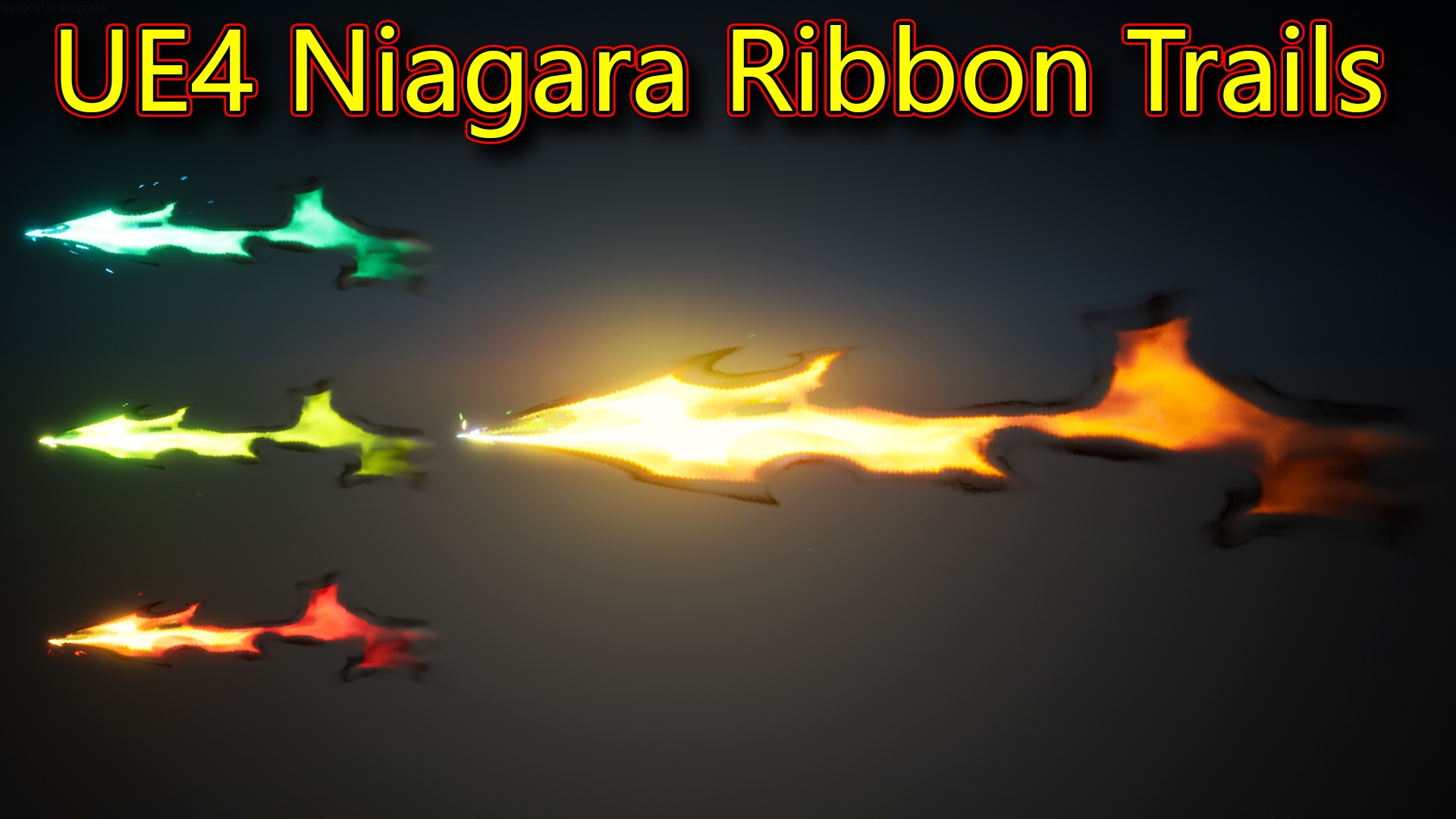
Hi guys today i have created these ribbon trails in unreal engine Niagara. this effect is more based on material and texture Niagara system is so simple for this. i will create this from scratch so follow along and create your own.
#cghow #RealtimeVFX #UE4Niagara #gamefx #ue4vfx #ue4fx #niagara #unrealengineniagara #unrealenginevfxtutorials
●Upload Your Tutorials/Work – https://cghow.com/
Purchase Effect Package From Unreal engine Marketplace –
Unreal Engine Niagara Effects in Marketplace – https://youtu.be/DF4Lb_btEus
Niagara Effects Pack in Marketplace – https://youtu.be/g6_k8T7FqHA
Unreal Engine Advanced Magical Effects in Marketplace – https://youtu.be/0Dn3GLIzhMo
Smoke in UE4 Niagara Pack01 in Unreal Engine Marketplace – https://youtu.be/38BPA_9yqJ8
UE4 Niagara Fire Pack 01 in Marketplace – https://youtu.be/PW5FL-zZoP4
UE4 Niagara Fire Pack 02 in Marketplace – https://youtu.be/fdLXPlUEzxM
UE4 Niagara Explosions Pack 02 in Marketplace – https://youtu.be/dj-XX9he4aE
Unreal Engine Niagara Effects Pack 03 in Marketplace – https://youtu.be/0kKon43I-Og
Slow Motion Explosion in UE4 Niagara Pack 04 in Marketplace – https://youtu.be/lUK1eW5zRP0
Unreal Engine Niagara Effects pack 04 in Marketplace – https://youtu.be/MihWYB31Gi4
Slow Motion Explosion in UE4 Niagara Pack 04 in Marketplace – https://youtu.be/lUK1eW5zRP0
UE4.25 Niagara Effects Pack 05 in Marketplace – https://youtu.be/sn1HIENVTDI
UE4.25 Niagara Effects Pack 06 in Marketplace – https://youtu.be/pvH_xGQ5jvs
Explosions Package in Unreal Engine Niagara Particle System – https://youtu.be/1mbqWscjUJ4
●Follow FB Page – https://www.facebook.com/cghow0/
●Join FB Group – https://www.facebook.com/groups/cghow/
●Android App – http://bit.ly/2XUnhoR
Playlists-
●Unreal Engine Niagara Tutorials – http://bit.ly/2SmPEuT
●Unreal engine VFX Tutorials -http://bit.ly/2JNXyJZ
●Unity VFX Tutorials – http://bit.ly/2XNGlKz


Video Description for CGHOW YouTube Channel:
Title: Creating a Magical Trail Effect in Unreal Engine Niagara – CGHOW Tutorial
Description: Hello everyone, I’m Asif Ali, and welcome to CGHOW! In today’s tutorial, I’ll show you how to create a stunning magical trail effect in Unreal Engine using Niagara. This video dives into creating a vibrant, customizable ribbon trail that follows particle movement and displays dynamic color variations.
Here’s what you’ll learn in this tutorial:
- Custom Texture Creation: Learn how to make a seamless, tileable texture in Photoshop to use as the base for the trail material.
- Material Setup: Set up a custom Unreal Engine material to control the ribbon’s colors, gradient, and fade effects along its length.
- Niagara Emitter Setup: Set up a Niagara emitter with ribbon and sprite components, using spawn rates, velocity, and color control to get the perfect trail effect.
- Color Animation: Use dynamic parameters to create smooth color shifts and variations along the trail.
This effect is a powerful addition to your VFX toolkit, perfect for adding magical, stylized trails in Unreal Engine!
If you enjoyed this tutorial, please subscribe to CGHOW and click the bell icon to get notified of new videos. Feel free to leave any questions in the comments below.
Key Points:
- Trail Texture: Use Photoshop to create a custom, tileable texture for the ribbon.
- Dynamic Colors: Adjust and animate colors for a magical, shifting effect.
- Ribbon & Sprite Emitters: Combine ribbon and sprite emitters for a complete particle trail.
- Material Panning and Fading: Create a smooth fade and distortion along the ribbon trail.
Tags: #UnrealEngine #NiagaraVFX #MagicalTrailEffect #CGHOW #GameVFX #NiagaraTutorial
For more tips, tricks, and in-depth Unreal Engine tutorials, check out CGHOW.com. Let’s keep pushing the boundaries of VFX together!
Leave a Reply