

Download – https://www.patreon.com/posts/64463843
Ref – https://bit.ly/3ITicEZ
NFT – https://opensea.io/CGHOW
Twitter – https://twitter.com/cghow_
👉👉 If you Liked it – http://bit.ly/2UZmiZ4
Channel Ashif – http://bit.ly/3aYaniw
Support me on – https://www.patreon.com/Ashif
Support me on – paypal.me/9953280644
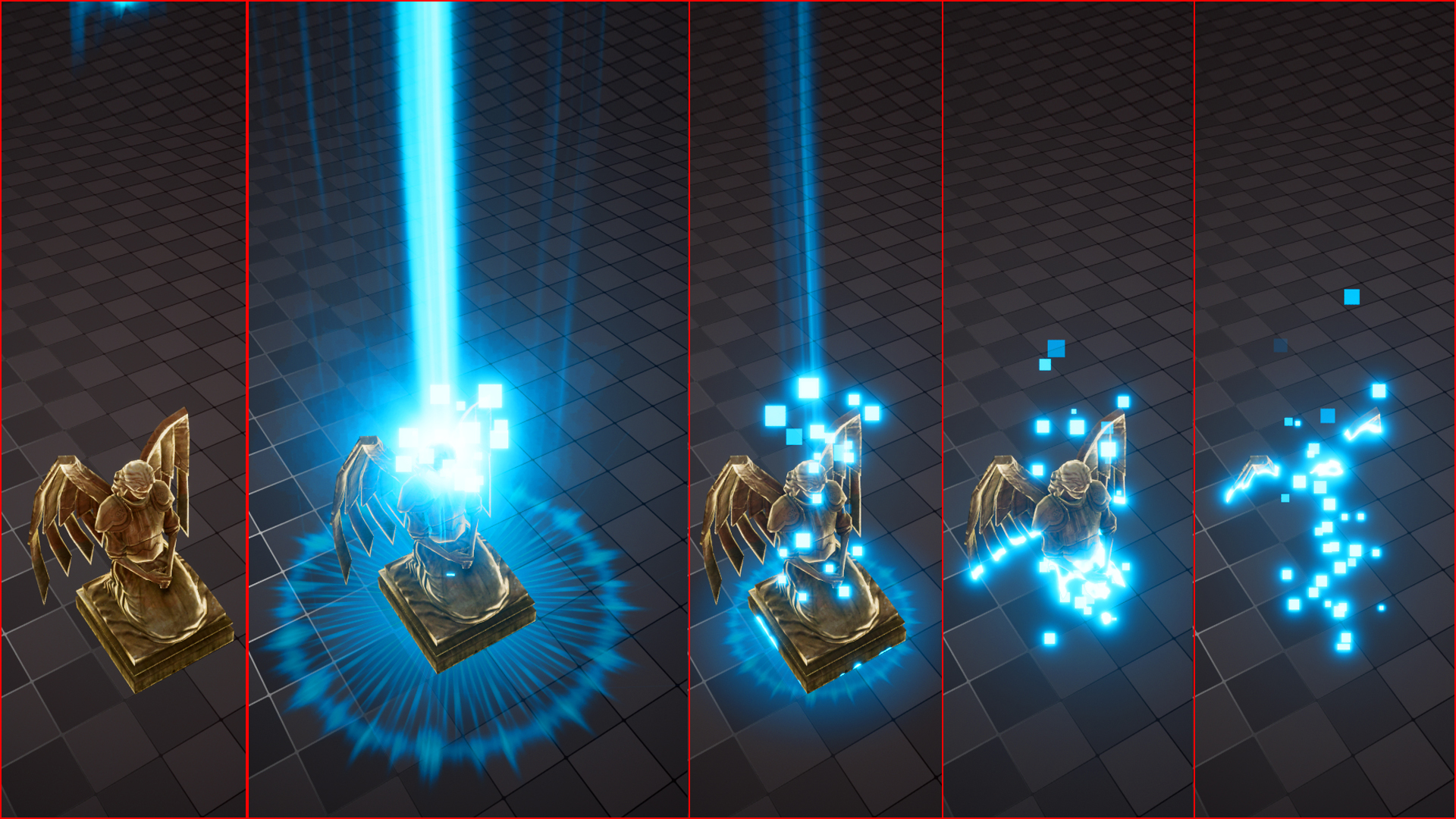
StarCraft II FX in UE5 Niagara Tutorial | Download Files
StarCraft II: Legacy of the Void
#cghow #UE5 #UE4Niagara #gamefx #ue5niagara #ue4vfx #niagara #unrealengineniagara #realtimevfx
●Upload Your Tutorials/Work – https://cghow.com/
Purchase Effect Package From Unreal engine Marketplace –
Unreal Engine Niagara Effects in Marketplace – https://youtu.be/DF4Lb_btEus
Niagara Effects Pack in Marketplace – https://youtu.be/g6_k8T7FqHA
Unreal Engine Advanced Magical Effects in Marketplace – https://youtu.be/0Dn3GLIzhMo
Smoke in UE4 Niagara Pack01 in Unreal Engine Marketplace – https://youtu.be/38BPA_9yqJ8
UE4 Niagara Fire Pack 01 in Marketplace – https://youtu.be/PW5FL-zZoP4
UE4 Niagara Fire Pack 02 in Marketplace – https://youtu.be/fdLXPlUEzxM
UE4 Niagara Explosions Pack 02 in Marketplace – https://youtu.be/dj-XX9he4aE
Unreal Engine Niagara Effects Pack 03 in Marketplace – https://youtu.be/0kKon43I-Og
Slow Motion Explosion in UE4 Niagara Pack 04 in Marketplace – https://youtu.be/lUK1eW5zRP0
Unreal Engine Niagara Effects pack 04 in Marketplace – https://youtu.be/MihWYB31Gi4
Slow Motion Explosion in UE4 Niagara Pack 04 in Marketplace – https://youtu.be/lUK1eW5zRP0
UE4.25 Niagara Effects Pack 05 in Marketplace – https://youtu.be/sn1HIENVTDI
UE4.25 Niagara Effects Pack 06 in Marketplace – https://youtu.be/pvH_xGQ5jvs
Explosions Package in Unreal Engine Niagara Particle System – https://youtu.be/1mbqWscjUJ4
●Follow FB Page – https://www.facebook.com/cghow0/
●Join FB Group – https://www.facebook.com/groups/cghow/
●Android App – http://bit.ly/2XUnhoR
Playlists-
●Unreal Engine Niagara Tutorials – http://bit.ly/2SmPEuT
●Unreal engine VFX Tutorials -http://bit.ly/2JNXyJZ
●Unity VFX Tutorials – http://bit.ly/2XNGlKz
Intro:
Hi guys, I’m Asif Ali, and you’re watching CGHOW. Today, we’re going to create a StarCraft-style game effect in Unreal Engine 5 using Niagara. I’ll be building it from scratch so you can learn better. If you haven’t subscribed yet, please do so, and don’t forget to like, share, and comment if you like this video. Also, follow me on Twitter @your_underscore. Let’s get started!
Part 1: Project Setup
- Found a StarCraft effect on cgizor.com (show reference gif).
- Create a new folder for the project (StarCraft_01).
- Choose a mesh that works (instead of a car mesh, opt for another suitable mesh in your project).
- Create a material named “Dissolve” and an effect folder.
Part 2: Effect Creation
- Material Setup:
- Use sphere mask for the dissolve effect.
- Adjust parameters for radius, hardness, and opacity.
- Connect the sphere mask to emissive, creating a dissolving effect based on the gif.
- Particle Setup:
- Set up a Niagara particle system, using local space for movement and adjusting particle life to fit the reference.
- Apply the dissolve material and adjust for transparency and color (use dynamic parameters to animate the dissolve effect).
- Add a fresnel effect to brighten the edges of the mesh.
Part 3: Animation and Effects
- Add Rays:
- Create a beam material with particle color.
- Set up the rays to move from top to bottom with random tiling and rotation.
- Adjust scale, opacity, and add randomization.
- Add Shockwave and Flash:
- Use radial effects for the shockwave and glow when the mesh dissolves.
- Add a “flash” effect on impact using a simple material.
- Ground Glow and Particle Movement:
- When the shockwave impacts the ground, create a radial glow and use sprite particles for the flash effect.
- Use random velocities and burst particles to simulate the impact.
- Additional Effects (Cubes & Rings):
- Use cube particles to simulate debris being ejected when the effect hits the surface.
- Create shockwave rings by applying textures and radial distortion to simulate the scaling effect.
Outro:
And that’s it! We’ve successfully created a StarCraft-inspired dissolve effect in Unreal Engine 5 using Niagara. If you found this tutorial helpful, don’t forget to like, comment, and subscribe. Also, check out my other tutorials for more Unreal Engine VFX tips. Thanks for watching!
Leave a Reply