

Effect Inspired from – https://www.magesbox.com/course/detai…
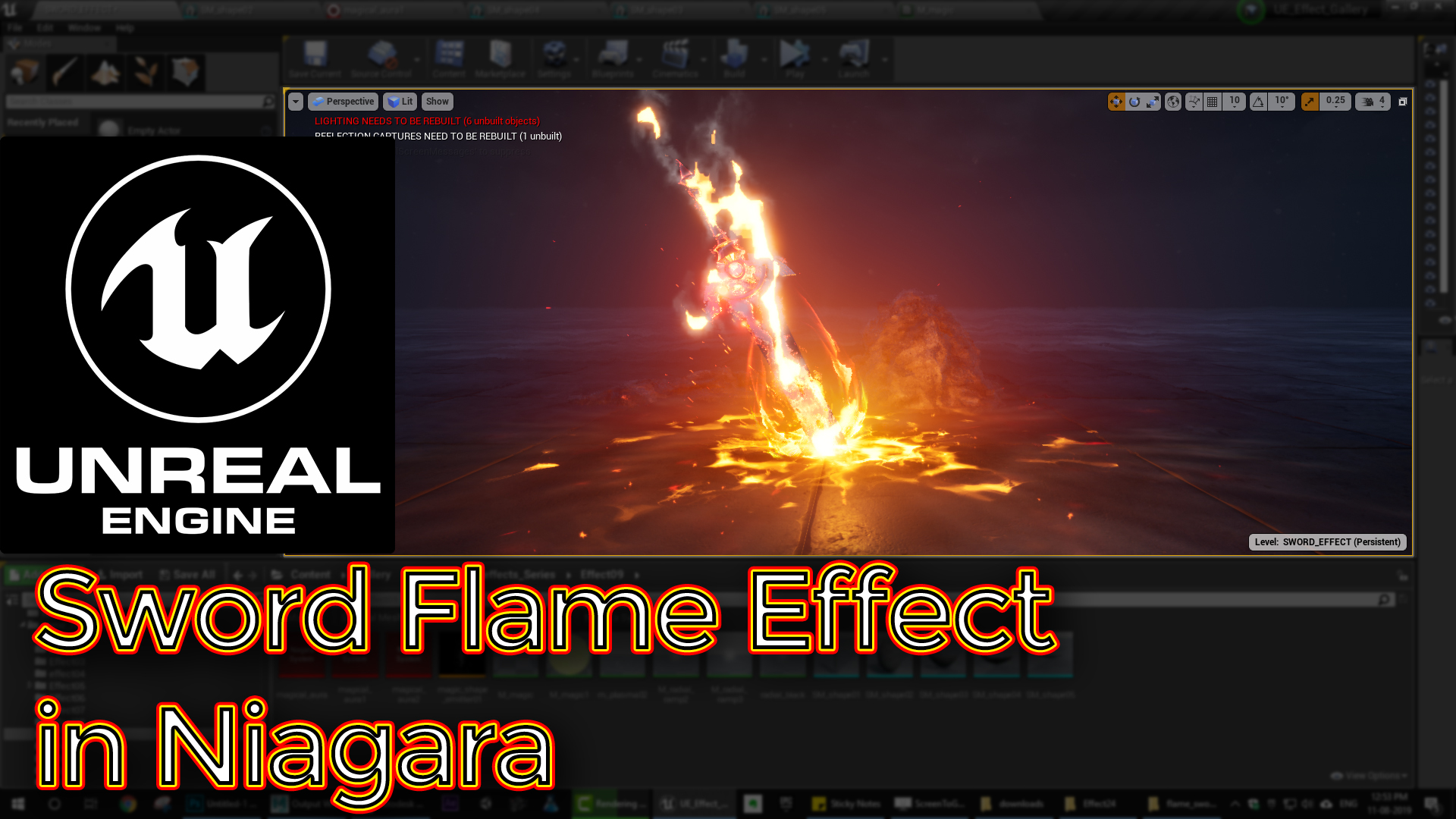
In this tutorial you will learn how to create Sword Flame Effect in unreal engine. you will learn every step for this effect texture, materials, mesh and emitters. For any concern comment below the video or create help thread in CGHOW form (discussion & help forum link below)
#unrealenginevfxtutorials #cghow #unrealengine #gamevfx #gamefx #ue4vfx #ue4fx #niagara #unrealengineniagara
●Upload Your Tutorials/Work – https://cghow.com/
…………………………………………………………………………………………………………
Purchase Effect Package From Unreal engine Marketplace –
●Niagara Effects Pack – http://bit.ly/2LWgZTx
●Advanced Magical FX – http://bit.ly/2XQYyXL
……………………………………………………………………………………………………………………………………
●Patreon – https://www.patreon.com/Ashif
……………………………………………………………………………………………………………………………………
●Follow FB Page – https://www.facebook.com/cghow0/
●Join FB Group – https://www.facebook.com/groups/cghow/
……………………………………………………………………………………………………………………………………
●Android App – http://bit.ly/2XUnhoR
……………………………………………………………………………………………………………………………………
Playlists-
●Unreal Engine Niagara Tutorials – http://bit.ly/2SmPEuT
●Unreal engine VFX Tutorials -http://bit.ly/2JNXyJZ
●Unity VFX Tutorials – http://bit.ly/2XNGlKz
……………………………………………………………………………………………………………………………………
●Discussion & Help Forum – http://bit.ly/2Lo0Er7
……………………………………………………………………………………………………………………………………
Creating a Flaming Sword Effect in Unreal Engine | VFX Tutorial
Hello everyone! I’m Asif Ali, and you’re watching CGHOW. In today’s tutorial, I’ll show you how to create this Flaming Sword Effect that I was inspired to make after seeing a similar effect online. Let’s dive into how I created it!
Before we begin: Make sure to subscribe to my channel and hit the bell icon so you never miss a new tutorial!
Effect Breakdown:
- Inspiration:
- The idea for this effect was inspired by a piece I found while browsing Magic Sparks (I couldn’t read the Chinese text, but thanks to the author, Chenggang, for inspiring me!). My version isn’t exactly the same, but I based my effect on their concept.
- Starting from Previous Tutorials:
- I didn’t create everything from scratch. I used elements from previous tutorials:
- Star Effect
- Goku Effect (Red)
- Ground Effect
- These are all available on my channel, so you can check them out if you want to learn more about those individual pieces.
- I didn’t create everything from scratch. I used elements from previous tutorials:
- Distortion Effect:
- To create the heat distortion, I used a heat material that I often use in my tutorials. It distorts the environment, and the particles are scaled randomly. The material uses noise and dynamic parameters to control the intensity of the effect.
- Plasma Ground Effect:
- For the ground effect, I used a material that distorts a flash texture. The material erodes through a noise texture and uses dynamic parameters to control distortion, erosion, and random tile variations.
- The particles are scaled and randomize their life cycle, creating a plasma-like effect.
- Ring Effect:
- The ring around the sword uses a similar material with noise and dynamic parameters. The sprites are scaled rather than using velocity, and the color transitions from yellow to red.
- Glow Effect:
- The glow material emits light on the ground, giving the sword a radiant look. I used a radial ramp and scaled the sprites from yellow to red to create the glowing effect.
- Sparks and Plasma Effects:
- I added sparks shooting from the center of the sword and plasma cords that extend outwards.
- The sparks use a random life and velocity, and the color transitions from yellow to red.
- Plasma is also generated, and I adjust its intensity to make the flames appear stronger.
- Sword and Smoke Mesh:
- For the sword itself, I used a mesh with a burning effect along the edges. I created smoke using a sub UV animation, which I applied in the particle system. The smoke has a constant life cycle and rotates to match the sword’s orientation.
- Flame and Smoke Interaction:
- I added flame particles that are smaller than the smoke, using a different material to erode the flames and create a more intense red color.
- Marking the Ground:
- To mark the ground, I used a texture with normal mapping to simulate interaction marks as the sword touches the ground.
- Additional Effects:
- More sparks are generated where the sword interacts with the ground.
- I also used a glow effect to fill the scene, making the effect feel more alive and radiant.
Viewport Breakdown:
In the viewport, you’ll see how all the parts come together:
- Distortion: The heat waves around the sword.
- Plasma and Ground Effects: The plasma around the sword and glowing ground.
- Sparks: The random bursts of sparks emitted from the sword’s center.
- Flames and Smoke: Smoke rises from the sword, and the flames erode and glow.
- Marking and Interactions: The sword interacting with the ground, leaving marks and sparks.
Customization Tips:
You can modify this effect by:
- Adjusting the size and color of the flame and smoke particles.
- Adding more complex materials for the plasma and distortion effects.
- Changing the shape or texture of the sword mesh for a different look.
- Experimenting with the ground effects and adding more interaction marks or explosions.
I hope this tutorial helps you create your own Flaming Sword Effect! If you have any questions or want to share your version, feel free to comment below.
Don’t forget to:
- Like, share, and subscribe
- Support me on Patreon (link in the description)
Thanks for watching, and keep learning!
— Asif Ali
Tags:
- Unreal Engine VFX
- Flaming Sword Effect
- Plasma Effect
- Fire and Smoke VFX
- Ground Effects Tutorial
- Unreal Engine Particle Systems
- Asif Ali VFX
Leave a Reply