

Support me on – https://www.patreon.com/Ashif
Support me on – paypal.me/9953280644
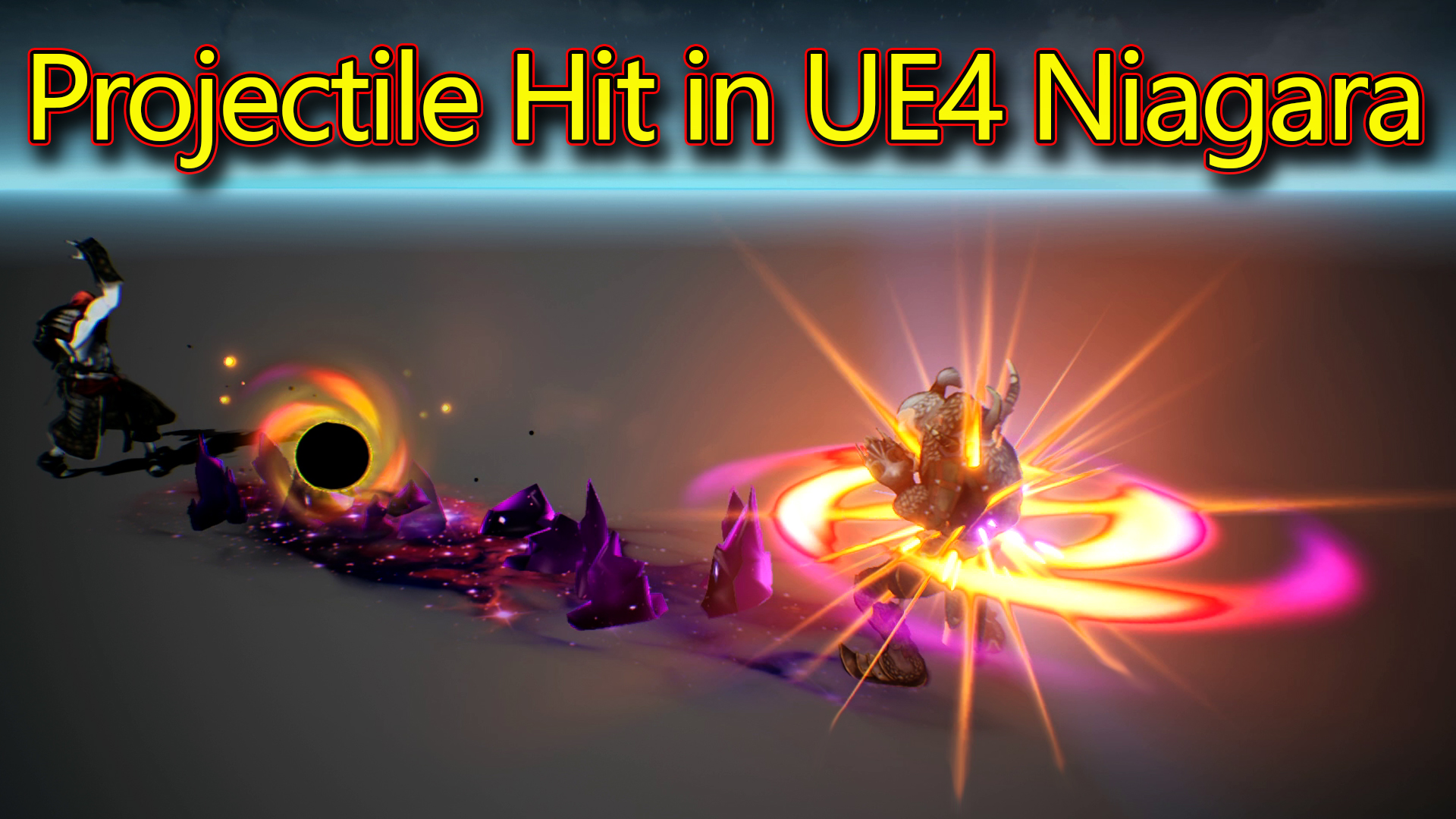
Hi, guys today I have created projectile effects in unreal engine Niagara. emitters and materials for this effect are so simple but altogether output looks good.
#cghow #RealtimeVFX #UE4Niagara #gamefx #ue4vfx #ue4fx #niagara #unrealengineniagara #unrealenginevfxtutorials
●Upload Your Tutorials/Work – https://cghow.com/
Purchase Effect Package From Unreal engine Marketplace –
Unreal Engine Niagara Effects in Marketplace – https://youtu.be/DF4Lb_btEus
Niagara Effects Pack in Marketplace – https://youtu.be/g6_k8T7FqHA
Unreal Engine Advanced Magical Effects in Marketplace – https://youtu.be/0Dn3GLIzhMo
Smoke in UE4 Niagara Pack01 in Unreal Engine Marketplace – https://youtu.be/38BPA_9yqJ8
UE4 Niagara Fire Pack 01 in Marketplace – https://youtu.be/PW5FL-zZoP4
UE4 Niagara Fire Pack 02 in Marketplace – https://youtu.be/fdLXPlUEzxM
UE4 Niagara Explosions Pack 02 in Marketplace – https://youtu.be/dj-XX9he4aE
Unreal Engine Niagara Effects Pack 03 in Marketplace – https://youtu.be/0kKon43I-Og
Slow Motion Explosion in UE4 Niagara Pack 04 in Marketplace – https://youtu.be/lUK1eW5zRP0
Unreal Engine Niagara Effects pack 04 in Marketplace – https://youtu.be/MihWYB31Gi4
Slow Motion Explosion in UE4 Niagara Pack 04 in Marketplace – https://youtu.be/lUK1eW5zRP0
UE4.25 Niagara Effects Pack 05 in Marketplace – https://youtu.be/sn1HIENVTDI
UE4.25 Niagara Effects Pack 06 in Marketplace – https://youtu.be/pvH_xGQ5jvs
Explosions Package in Unreal Engine Niagara Particle System – https://youtu.be/1mbqWscjUJ4
●Follow FB Page – https://www.facebook.com/cghow0/
●Join FB Group – https://www.facebook.com/groups/cghow/
●Android App – http://bit.ly/2XUnhoR
Playlists-
●Unreal Engine Niagara Tutorials – http://bit.ly/2SmPEuT
●Unreal engine VFX Tutorials -http://bit.ly/2JNXyJZ
●Unity VFX Tutorials – http://bit.ly/2XNGlKz


Creating a Dynamic Projectile Hit Effect in Unreal Engine Niagara | CGHOW
In this tutorial, Asif Ali, the creator behind CGHOW, demonstrates how to create a powerful projectile hit effect using Unreal Engine’s Niagara system. This effect incorporates a combination of glowing particles, mesh rocks, decals, and more, all synchronized with a character animation to achieve a seamless, visually stunning impact. Asif provides detailed insights into the timing, positioning, and material creation used to achieve this effect, with step-by-step instructions for replicating it in your own projects.
Key Notes:
- Animation Synchronization: The projectile hit effect duration matches the character’s animation timing (2.3 seconds). This synchronization ensures that the impact feels natural and aligned with the character’s actions.
- Spherometer Mesh: A sphere with yellow edges is used as the main element of the effect. Position curves are applied along the X, Y, and Z axes to animate the sphere from the hand to the target, ensuring the correct positioning of the effect.
- Ray Emitters: Rays are emitted around the sphere, with varying shades of yellow and orange. These rays help give depth and complexity to the impact effect.
- Glow Effects: Two glow effects are created, with the first being a simple yellow radial ramp material, and the second a larger orange glow. These glows enhance the intensity of the impact.
- Mesh Rocks: Mesh rocks with a galaxy-style material are used to simulate debris and ground impact. The rocks are animated with box location curves that scale up and down, adding realism to the explosion.
- Sparks and Fast Rotating Particles: The sparks emitted from the impact area are randomized in life, color, and size. Some particles rotate quickly, while others fade in size, contributing to the chaotic nature of the explosion.
- Decal Pattern: A galaxy-style pattern is created on the ground where the projectile hits. Using a combination of gradients, sine waves, and noise textures, the pattern animates dynamically to simulate impact damage on the surface.
- Flash Effect: A flash occurs at the moment of impact, using a simple texture that scales over time. The particles are randomly aligned to create a 3D flash effect.
- Sparks: Additional sparks are emitted with random size, life, and color, aligned to velocity and with varying strength, to enhance the visual complexity of the explosion.
- Radial and Soft Glow Effects: The glow particles scale up and fade over their life, with some particles scaling down for a softer look as they dissipate.
Trending Tags:
- #UnrealEngine
- #NiagaraVFX
- #ProjectileHitEffect
- #VFXTutorial
- #GameDevelopment
- #ParticleEffects
- #CGHOW
- #UnrealEngineVFX
Additional Notes:
This tutorial showcases how you can achieve a visually rich projectile hit effect using the Niagara particle system. By blending various techniques such as position curves, glow materials, and animated decals, you can create a highly dynamic and realistic effect that can be used in a wide range of games or cinematic scenes. The techniques presented here are perfect for VFX artists looking to enhance their impact effects in Unreal Engine.
For more tutorials like this, be sure to subscribe to the CGHOW YouTube channel and stay up to date with the latest VFX techniques in Unreal Engine!
Leave a Reply