

Support me on – https://www.patreon.com/Ashif
Support me on – paypal.me/9953280644
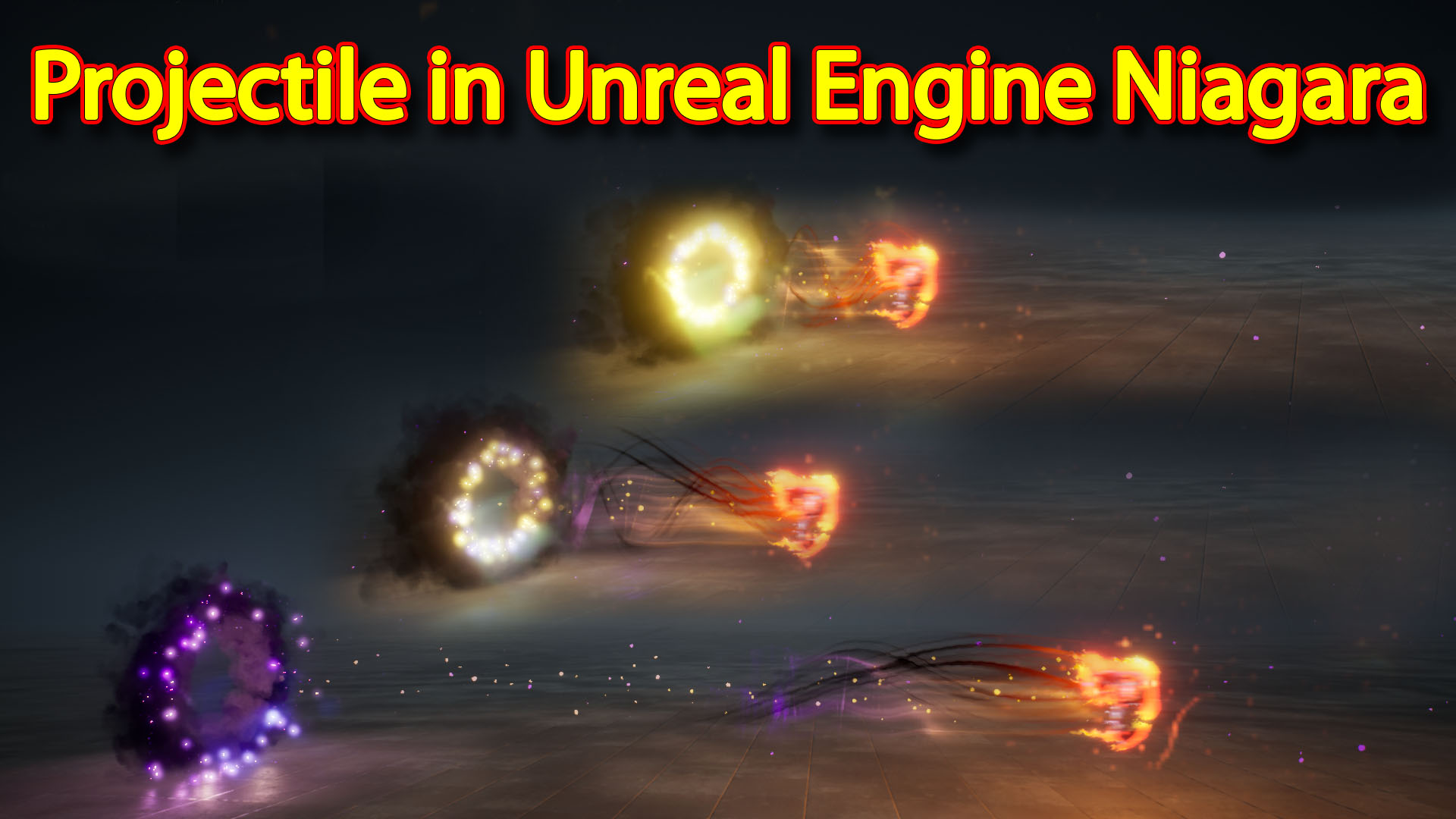
In this video i have created this projectile effect in unreal engine Niagara for this i used some elements like a axe as a weapon then three different type of trails like color tails, black train, fire trail and particle trails and i also created a source effect fro projectile for that i used a smoke ring that is rotating and some particle burst in a ring shape and falling on ground with some lights.
#cghow #RealtimeVFX #UE4Niagara #gamefx #ue4vfx #ue4fx #niagara #unrealengineniagara #unrealenginevfxtutorials
●Upload Your Tutorials/Work – https://cghow.com/
…………………………………………………………………………………………………………
Purchase Effect Package From Unreal engine Marketplace –
●Niagara Effects Pack – http://bit.ly/2LWgZTx
●Advanced Magical FX – http://bit.ly/2XQYyXL
……………………………………………………………………………………………………………………………………
●Patreon – https://www.patreon.com/Ashif
……………………………………………………………………………………………………………………………………
●Follow FB Page – https://www.facebook.com/cghow0/
●Join FB Group – https://www.facebook.com/groups/cghow/
……………………………………………………………………………………………………………………………………
●Android App – http://bit.ly/2XUnhoR
……………………………………………………………………………………………………………………………………
Playlists-
●Unreal Engine Niagara Tutorials – http://bit.ly/2SmPEuT
●Unreal engine VFX Tutorials -http://bit.ly/2JNXyJZ
●Unity VFX Tutorials – http://bit.ly/2XNGlKz
……………………………………………………………………………………………………………………………………
●Discussion & Help Forum – http://bit.ly/2Lo0Er7
……………………………………………………………………………………………………………………………………


Video Description: Hello everyone, I’m Asif Ali, and you’re watching CGHOW. In this tutorial, I’ll walk you through creating a dynamic smoke and particle effect in Unreal Engine. This project features a rotating smoke ring, weapon trails, and an engaging particle system, all achieved using Unreal Engine’s Niagara VFX tools. Let’s dive in and explore how you can create something like this in your own projects!
Tutorial Breakdown:
- Smoke Ring Effect:
- I used the Sprite Render and a 8×8 Smoke Sub-UV texture from Starter Content to create a rotating smoke ring. This texture is great for quick setups.
- Key settings include random particle sizes and rotation on the X-axis, and I used a Point Attractor to slightly spread the smoke particles.
- Color transition from purple to black gives a nice eerie effect.
- Trail Effects:
- Particle Burst is used to spawn particles from a torus shape, which spreads out with a random velocity and car noise for a more natural motion.
- I added some light to these particles to make them more dynamic and reduce particle spawn rates to keep performance stable.
- Ribbon Trails for the weapon’s effect: I used a simple material and texture manipulation to create a smooth, dynamic trail effect that follows the weapon’s movement.
- Weapon & Smoke Interaction:
- I utilized Event Handlers to link the smoke and weapon trails with the moving object, making the trails follow its motion.
- Gravity was adjusted to make the trails behave naturally, falling over time.
- Initial rotation was applied to the weapon’s mesh to ensure the effects aligned correctly.
Technical Details:
- SubUV Texture: Used the 8×8 smoke texture for the ring. You can easily use this in your own projects or create a custom one.
- Trails: Used ribbon particles for fluid motion and noise textures to distort the movement.
- Materials: Used Sine wave to control particle size and RGB patterns for the trails’ color transitions.
Final Thoughts:
This effect is ideal for creating smoke-based particles, weapon trails, and anything involving moving, rotating elements. Experiment with the settings to create your unique effects.
Don’t forget to subscribe to CGHOW for more Unreal Engine tutorials, and hit the bell icon to receive all new video notifications!
Key Points:
- Sprite Render for smoke ring.
- Point Attractor for particle spread.
- Light addition to trails for more depth.
- Ribbon Trails and Sine wave material for fluid motion.
- Event Handlers for synchronization of effects with moving objects.
Tags: #UnrealEngine #NiagaraVFX #SmokeEffect #WeaponTrails #ParticleSystem #GameVFX #CGHOW #Tutorial
Leave a Reply