
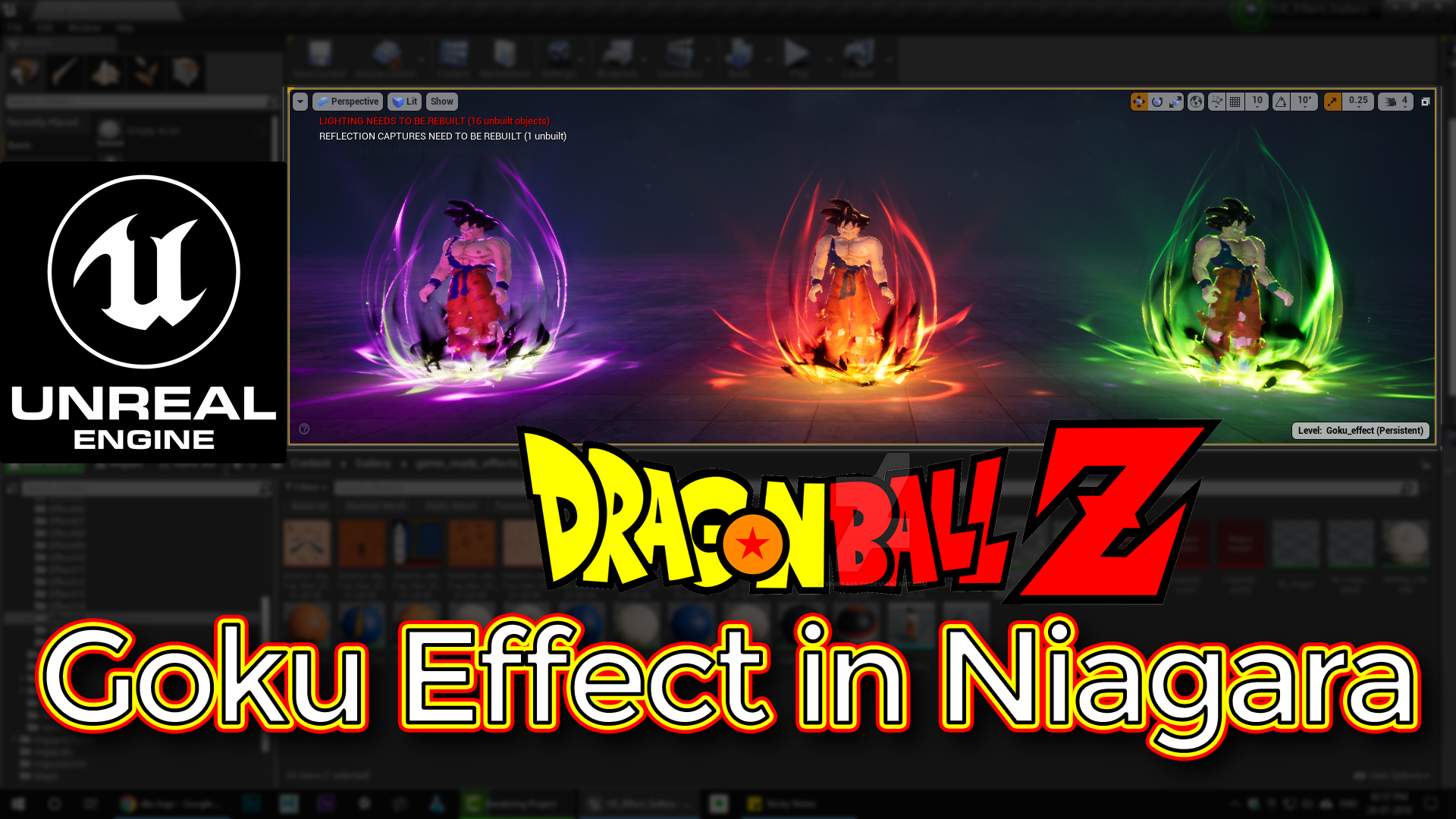

In this tutorial you will learn how to create DragonBall-Z Goku Effect in Niagara in unreal engine. you will learn every step for this effect texture, materials, mesh and emitters. For any concern comment below the video or create help thread in CGHOW form (discussion & help forum link below)
#unrealenginevfxtutorials #cghow #unrealengine #gamevfx #gamefx #ue4vfx #ue4fx #niagara #unrealengineniagara
●Upload Your Tutorials/Work – https://cghow.com/
…………………………………………………………………………………………………………
Purchase Effect Package From Unreal engine Marketplace –
●Niagara Effects Pack – http://bit.ly/2LWgZTx
●Advanced Magical FX – http://bit.ly/2XQYyXL
……………………………………………………………………………………………………………………………………
●Patreon – https://www.patreon.com/Ashif
……………………………………………………………………………………………………………………………………
●Follow FB Page – https://www.facebook.com/cghow0/
●Join FB Group – https://www.facebook.com/groups/cghow/
……………………………………………………………………………………………………………………………………
●Android App – http://bit.ly/2XUnhoR
……………………………………………………………………………………………………………………………………
Playlists-
●Unreal Engine Niagara Tutorials – http://bit.ly/2SmPEuT
●Unreal engine VFX Tutorials -http://bit.ly/2JNXyJZ
●Unity VFX Tutorials – http://bit.ly/2XNGlKz
……………………………………………………………………………………………………………………………………
●Discussion & Help Forum – http://bit.ly/2Lo0Er7
……………………………………………………………………………………………………………………………………
In this tutorial, I’ll walk you through how to create a Goku Effect requested by one of my subscribers. This effect has three color variations (red, purple, and green), and I’ll show you how I created the red version. You can easily adjust the colors and tweak the effect to match your needs. This effect features glowing particles, dynamic mesh distortion, and powerful lightning that fits the aesthetic of Goku-style energy blasts.
Key Notes:
- Sparks Emitter:
- The sparks emitter is used to create energetic particle effects around the character.
- I start by spawning 50 particles, with a random lifetime and a sphere location radius of 100.
- The color changes over life from yellow to orange to red. The particles move upward with low gravity and curl noise to introduce some random movement.
- Scale over life causes the particles to shrink as they die, and a basic texture is applied for the sparks.
- Magical Shape Emitter:
- This emitter creates the core effect with a mesh texture that gets distorted over time.
- The material applied to the mesh uses a texture that’s panned and eroded using dynamic parameters to control the distortion.
- The shape is randomized to create different variations, and the mesh is rotating to add movement and complexity to the effect.
- The particles spawn at 30 particles, with random size and rotation, and color transitions from yellow to orange to red.
- The distortion effect can be controlled using a dynamic parameter, giving it a more fluid, evolving look.
- Ground Glow Emitter:
- The ground glow effect is created using a ring texture that is distorted with noise and eroded over time.
- The glow scales over life and transitions from yellow to orange to red as it expands.
- I used a planar mesh to spawn the particles, with random life and random rotation.
- Rays Emitter:
- The rays emitter generates light streaks that originate from the character.
- I use a texture to create rays that scale and fade over time.
- The sprite size and color change from yellow to red over the life of the particles.
- Lightning Emitter:
- The lightning effect is created using a mesh with a material that gives it a random initial rotation for each frame.
- The spawn rate is set to 10, with a low life span, and the dynamic parameter allows the lightning to blink on and off.
- Distortion Emitter:
- The distortion emitter creates an additional effect where the particles appear to distort or warp.
- I used a larger sprite size for this version of the emitter to create the illusion of a larger, more visible distortion effect.
- Variations:
- I created three different versions of this effect by changing the color and material applied to each emitter.
- You can easily modify these variations to create more colorful effects, such as red, purple, or green, to match the energy style of Goku or similar characters.
Trending Tags:
- #UnrealEngine
- #NiagaraVFX
- #GokuEffect
- #DragonBallZ
- #VFXTutorial
- #ParticleEffects
- #EnergyBlast
- #NiagaraSystem
- #VisualEffects
- #UnrealEngineTutorial
Additional Notes:
- Customization:
- The effect is designed to be highly customizable, so you can adjust the speed, size, and color of particles for your own needs.
- Use the dynamic parameters to control the level of distortion and the speed of particle movement for more control over the final look.
- The spark effect and lightning effect can be further modified to achieve more intense or subtle results depending on the type of energy effect you want to create.
This Goku Effect in Unreal Engine is a fantastic way to add dynamic energy to your projects, and it’s highly customizable to fit the exact visual style you want. By combining sparks, glowing particles, and lightning, you can create powerful and impactful energy effects. If you have any queries or need further clarification, feel free to leave a comment below.
Thanks for watching, and don’t forget to subscribe, like, and share the video. Keep experimenting and learning!
Leave a Reply