

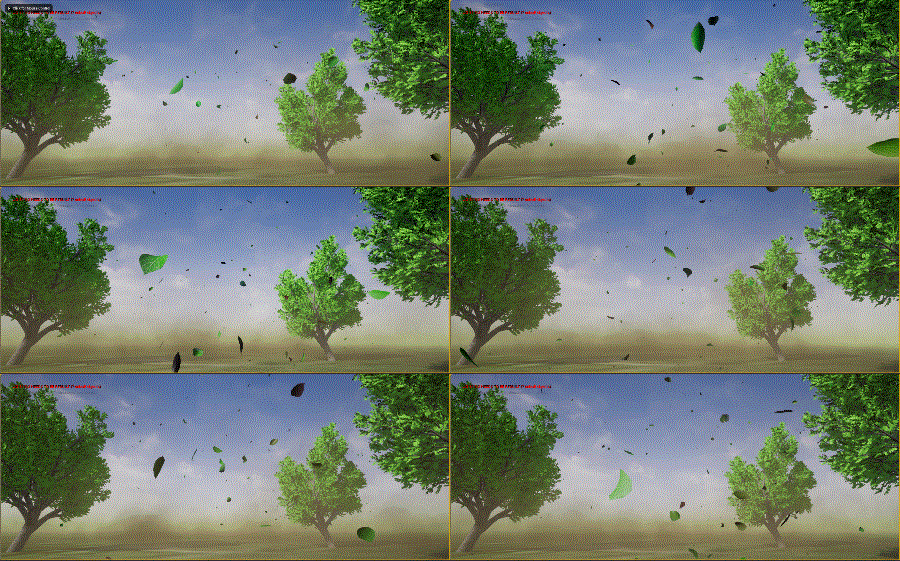
In this tutorial you will learn how to create Falling Leaves in Niagara
in unreal engine. you will learn every step for this effect texture, materials, mesh and emitters. For any concern comment below the video or create help thread in CGHOW form (discussion & help forum link below)
#unrealenginevfxtutorials #cghow #unrealengine #gamevfx #gamefx #ue4vfx #ue4fx #niagara #unrealengineniagara
●Upload Your Tutorials/Work – https://cghow.com/
…………………………………………………………………………………………………………
Purchase Effect Package From Unreal engine Marketplace –
●Niagara Effects Pack – http://bit.ly/2LWgZTx
●Advanced Magical FX – http://bit.ly/2XQYyXL
……………………………………………………………………………………………………………………………………
●Patreon – https://www.patreon.com/Ashif
……………………………………………………………………………………………………………………………………
●Follow FB Page – https://www.facebook.com/cghow0/
●Join FB Group – https://www.facebook.com/groups/cghow/
……………………………………………………………………………………………………………………………………
●Android App – http://bit.ly/2XUnhoR
……………………………………………………………………………………………………………………………………
Playlists-
●Unreal Engine Niagara Tutorials – http://bit.ly/2SmPEuT
●Unreal engine VFX Tutorials -http://bit.ly/2JNXyJZ
●Unity VFX Tutorials – http://bit.ly/2XNGlKz
……………………………………………………………………………………………………………………………………
●Discussion & Help Forum – http://bit.ly/2Lo0Er7
……………………………………………………………………………………………………………………………………
Creating a Falling Leaves Scene in Unreal Engine: A Breakdown of Materials, Particles, and Camera Shake
In this tutorial, Asif Ali demonstrates how to create a falling leaves scene, complete with animated trees, blowing dust, and a subtle camera shake. The scene comes alive with dynamic elements, giving you a great opportunity to learn particle systems and materials in Unreal Engine.
Key Elements in the Scene
- Falling Leaves and Tree Animation
The main feature of the scene is the falling leaves. Asif uses mesh-based particles for the leaves, with a custom material that simulates wind and movement. The leaves are animated using:- Noise values for randomization.
- Wind intensity and speed to control the movement of the leaves.
- Material instance parameters to adjust these values dynamically.
- Falling Leaf Particle System
The falling leaves are controlled through a particle system with mesh emitters. Each leaf mesh is a planar object deformed in Maya. The system includes:- Random life durations for each leaf.
- Velocity to simulate the falling motion.
- Gravity and collision settings to control the interaction with the ground.
- Dust and Environment Effects
The dust blowing through the scene is created using the smoke texture from Unreal’s starter content. The particles are emitted with:- Random life durations.
- Velocity in the -Y direction to simulate falling dust.
- Color changes over time to create the realistic dusty appearance.
- Camera Shake
To enhance the realism of the environment, a subtle camera shake is added. This effect simulates minor camera movements caused by wind or external forces. The shake is controlled using Unreal Engine’s Camera Shake Blueprint:- The camera shake properties are editable, allowing you to tweak rotation, pitch, and the overall intensity of the effect.
How to Recreate the Effect
To recreate this effect, follow these steps:
- Create a tree material with leaf texture, and set up an instance material for random noise and wind effects.
- Use mesh emitters to spawn the leaves in your particle system. Tweak spawn rates, velocities, and random life values.
- Animate the dust with a smoke texture, setting the sub-UV index to simulate dust particles.
- Apply a camera shake blueprint to add subtle movement to your camera, enhancing the dynamic feel of the scene.
By following this tutorial, you’ll learn the essential techniques needed to build a natural-looking environment with dynamic elements, from foliage to dust and camera effects. This is a great base for any environmental scene, and you can further customize it to fit specific needs for your projects.
Trendy Tags:
- Unreal Engine
- VFX
- Particle Systems
- Camera Shake
- Environmental Effects
- Niagara
- Material Setup
- Dynamic Scene
This tutorial offers a comprehensive breakdown of how to use Unreal Engine’s particle systems, materials, and blueprints to create realistic dynamic scenes. Feel free to experiment with different settings to enhance the look of your project!
Leave a Reply