

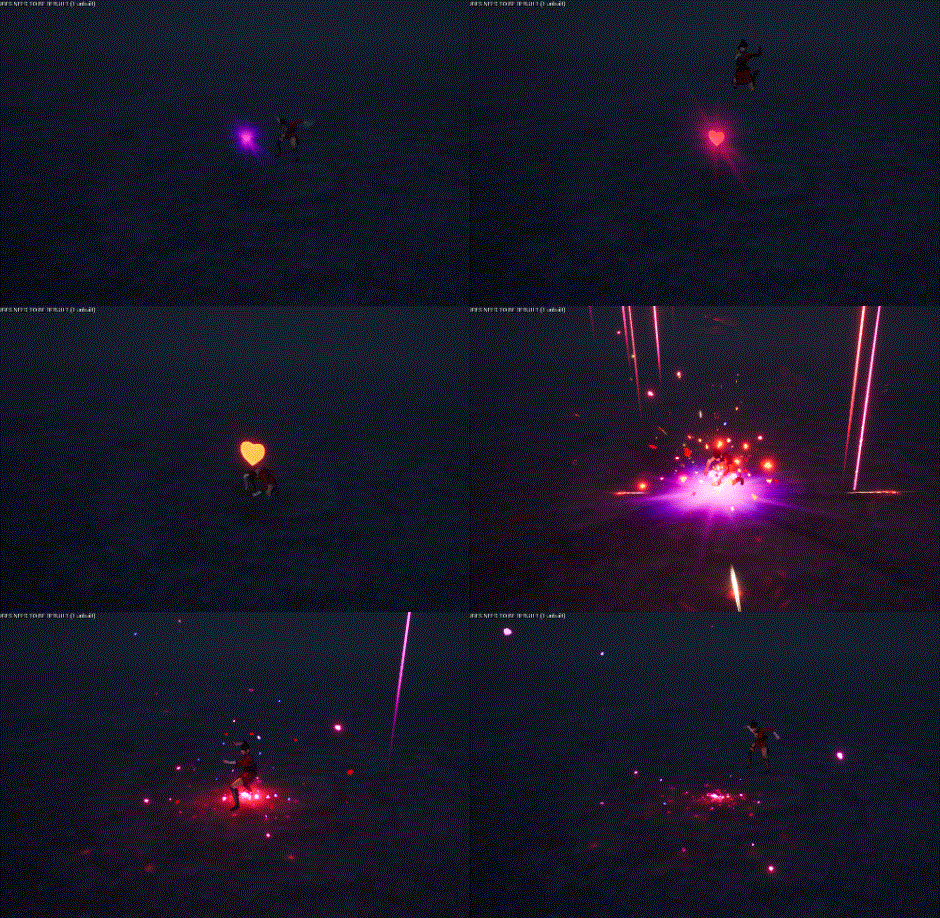
In this tutorial you will learn how to create Heart Attack Effect in Niagara in unreal engine. you will learn every step for this effect texture, materials, mesh and emitters. For any concern comment below the video or create help thread in CGHOW form (discussion & help forum link below)
#unrealenginevfxtutorials #cghow #unrealengine #gamevfx #gamefx #ue4vfx #ue4fx #niagara #unrealengineniagara
●Upload Your Tutorials/Work – https://cghow.com/
…………………………………………………………………………………………………………
Purchase Effect Package From Unreal engine Marketplace –
●Niagara Effects Pack – http://bit.ly/2LWgZTx
●Advanced Magical FX – http://bit.ly/2XQYyXL
……………………………………………………………………………………………………………………………………
●Patreon – https://www.patreon.com/Ashif
……………………………………………………………………………………………………………………………………
●Follow FB Page – https://www.facebook.com/cghow0/
●Join FB Group – https://www.facebook.com/groups/cghow/
……………………………………………………………………………………………………………………………………
●Android App – http://bit.ly/2XUnhoR
……………………………………………………………………………………………………………………………………
Playlists-
●Unreal Engine Niagara Tutorials – http://bit.ly/2SmPEuT
●Unreal engine VFX Tutorials -http://bit.ly/2JNXyJZ
●Unity VFX Tutorials – http://bit.ly/2XNGlKz
……………………………………………………………………………………………………………………………………
●Discussion & Help Forum – http://bit.ly/2Lo0Er7
……………………………………………………………………………………………………………………………………
Heart Attack Effect Tutorial in Unreal Engine Niagara
In this tutorial, I’ll walk you through the creation of the Heart Attack Effect, where we simulate a heart bulging, hitting the ground, and then bursting into heart-shaped particles. The effect also includes glowing flashes, streaks, and various dynamic behaviors, all made using Unreal Engine’s Niagara system. Let’s break it down!
Key Points:
- Initial Heart Emitter:
- The effect starts with a heart-shaped mesh that bulges using a world offset in the material.
- The bulging animation is controlled by a dynamic parameter, making the heart grow larger and shrink.
- The heart spawns with a constant life span, red color, and scaling animation that pulsates up and down.
- Falling Heart:
- After the heart bulges, it falls to the ground with a delay to match the bulging animation.
- Gravity is applied to the falling heart, and it has a randomized rotation and position for variation in the fall.
- When the heart hits the ground, particles burst out in all directions.
- Impact Heart Ring:
- Upon impact with the ground, the heart ring emits bulging heart particles with random sizes and colors.
- The particles have a random rotation, a velocity applied in all axes, and gravity to give the effect more realism.
- Ground Flash and Decals:
- The flash on the ground is created using a planar mesh and a simple texture that simulates the initial heart burst.
- The decal applied after the flash uses a glowing edge effect created by eroding the texture. This adds a glowing, radiant ring around the flash.
- The material used for the decal animates using dynamic parameters to create the glow effect.
- Ring and Glow Effects:
- A ring texture (created in Photoshop with the smudge tool) is used to simulate the glowing ring effect.
- The ring is scaled and animated over time, with an offset for the texture’s position.
- Heart Shaped Particles and Streaks:
- Several heart-shaped particles are spawned with random lifespans, rotations, and colors.
- Streak effects are applied, with stretching on the Y-axis and random particle sizes to create a dynamic flow.
- The particles are affected by gravity, making them fall to the ground naturally. Additionally, collisions are enabled for these particles.
- Streaks and Strikes:
- The strikes are designed using race textures and particles that are stretched and spread in various directions.
- Slower spawn rates and longer particles make the strikes appear more dramatic as they fade away.
- Customization Tips:
- You can change the color, life span, and scaling animations to create variations of the effect.
- Experiment with textures in Photoshop to create your own for rings and streaks.
- Adjust gravity and velocity values to tweak the falling and bursting behavior to fit your needs.
Trending Tags:
- #UnrealEngine
- #NiagaraVFX
- #HeartAttackEffect
- #VFXTutorial
- #ParticleEffects
- #HeartBurst
- #GlowEffects
- #UnrealEngineTutorial
- #ExplosionEffect
Final Thoughts:
This Heart Attack Effect is a combination of bulging heart animations, ground impact bursts, and glowing particles. By using the Niagara system, we can create a dynamic and customizable visual effect suitable for many types of scenes, from fantasy to action-packed games.
Thanks for following along! If you have any questions, drop them in the comments below, and don’t forget to subscribe, like, and share the video. Keep experimenting with these effects and keep learning!
Leave a Reply