Visit: https://cghow.com/ for more tutorials. submit your tutorial/Artwork.
In this tutorial you will learn how to create Magical Energy Effect in Niagara in unreal engine. you will learn every step for this effect texture, materials, mesh and emitters.
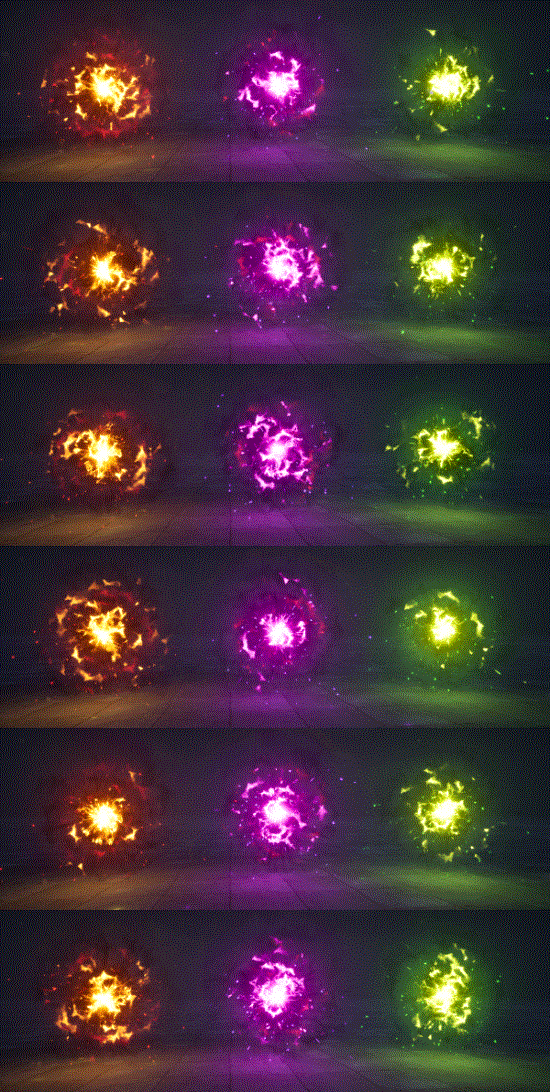
This tutorial shows how to create a magical energy effect in Unreal Engine 4 Niagara, with plasma like textures, material distortion and randomised particles forming an energy field.
Use it for magic shields, charging spells and power sources, and see the related posts below for more energy effects.
In this tutorial, I show you how to create a Magical Energy Effect using Unreal Engine’s Niagara system. This effect combines vibrant colors, plasma-like textures, and dynamic particle behaviors to give your scene an energetic and mystical vibe. The effect features randomized colors and a variety of emitter behaviors to generate an engaging, glowing, and energy-charged look.
The core of this effect includes dynamic material distortion, randomized particle behaviors, and various light interactions to create a magical energy field. I will take you through each step, showing how to customize this effect and tailor it to your own project, whether you’re going for a fiery red, a mystical green, or an electric blue.
Key Notes:
Plasma Effect Setup:
The plasma effect consists of three different plasma emitters, each with unique distortion and color settings.
Distortion, erosion, and noise tiling are controlled via dynamic parameters that allow for real-time adjustment.
Material Distortion:
Use a flash texture as the base for your plasma effect and distort it using a noise texture.
The three dynamic parameters—distortion, erode, and tiling—control how the texture behaves, adding variety to the overall look.
Erosion helps create an organic burning effect, while tiling allows for a change in the pattern density.
Particle Randomization:
The plasma particles are set to randomize their life span, size, and distortion values for each emitter to give the effect a natural, unpredictable feel.
Color transitions are used to create vivid contrasts, and the light intensity can be customized for each emitter.
Ring Glow Effect:
The ring glow is achieved by distorting a ring texture with noise, with similar dynamic parameter controls for distortion and erosion.
The ring particles scale and fade as they move outward, creating a glowing, ethereal halo.
Sparks and Distortion:
Sparks are added to the effect with a high spawn rate and random size to add an energetic touch.
The spark texture uses a flash material, and particles are given an omni-directional velocity to spread outward.
For added realism, heat distortion is introduced using a refraction effect with dynamic parameters.
Color Variations:
The effect comes in three variations: red, purple, and green, each with different intensity and color behaviors.
The colors transition from yellow to red, or purple to black, allowing for easy customization based on the desired aesthetic.
Light Interactions:
All the emitters, including plasma and sparks, are connected to lights that illuminate the ground as they interact, adding an immersive glow effect.
Lights are set to dynamic parameters, allowing for adjustments based on the surrounding particles.
Trending Tags:
#UnrealEngine
#NiagaraVFX
#MagicalEnergy
#VFXTutorial
#ParticleEffects
#EnergyVFX
#UnrealEngineTutorial
#NiagaraSystem
#VisualEffects
Additional Notes:
You can modify the dynamic parameters to control the speed and intensity of the distortion and erosion effects in real time. This makes it easier to experiment with different looks for your energy effect.
Customizing the noise texture and tiling can drastically change the visual pattern of the plasma, offering endless creative possibilities.
This effect is highly customizable, so feel free to experiment with different color schemes, particle sizes, and emitter behaviors to suit the atmosphere you want to create.
I am Ashif Ali, Real-Time VFX Artist, I make Unreal Engine Niagara Tutorial on this channel. I've made it my mission to share my knowledge and expertise with the world through my YouTube channel. So why not join me on this exciting adventure? Follow me on my social links, subscribe to my channel, and support my growth as a creator. Together, we can create amazing things and take our skills to new heights. And who knows, you might even get access to some of my exclusive files for free!
View Comments