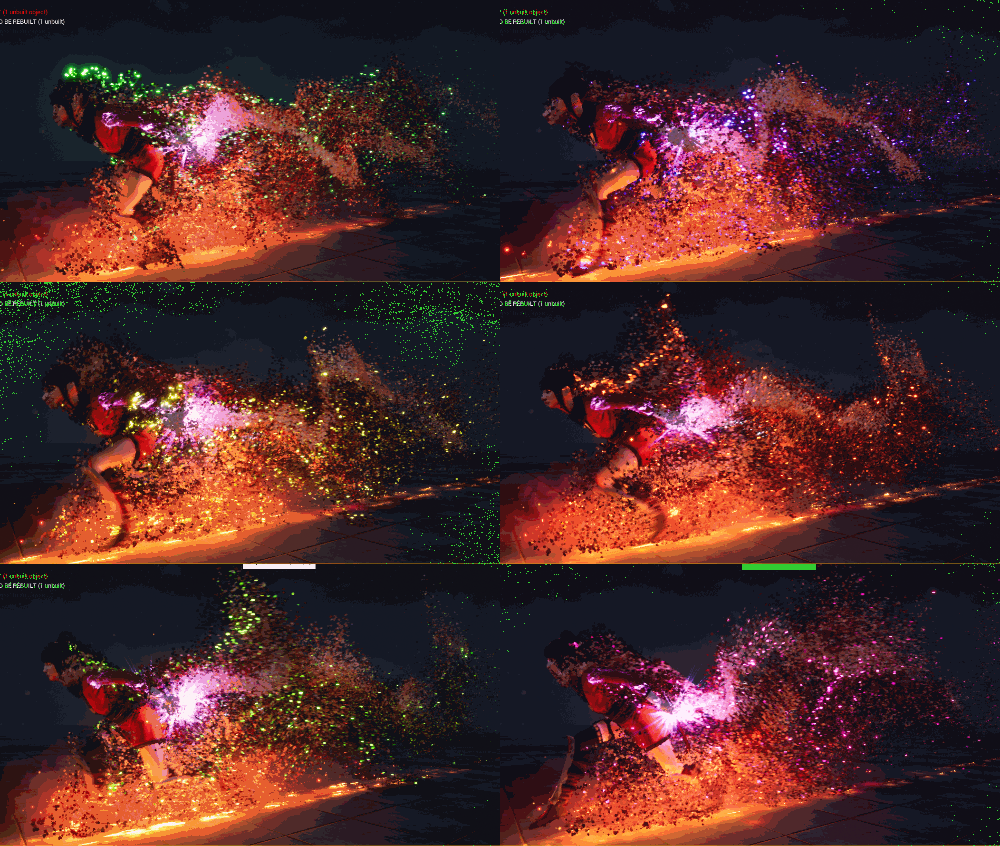
Unreal Engine Niagara Skeletal Mesh Disintegration Effect Tutorial
Visit: https://cghow.com/ for more tutorials. submit your tutorial/Artwork.
In this tutorial you will learn how to create Skeletal Mesh Disintegration Effect in unreal engine. you will learn every step for this effect texture, materials, mesh and emitters.
https://youtu.be/5SecDek0mCE ⚡ Turn Simple Grid into Electric Shock Cage VFX | Unreal Engine 5 Niagara…
https://youtu.be/0LoCTT7OJPs In this Unreal Engine 5 tutorial, you’ll learn how to create a stylized glowing…
https://youtu.be/OTSeWn2JGEA Learn how to create a vibrant Fantasy Magic Rainbow Spline VFX in Unreal Engine…
https://youtu.be/hW05dCOaeEg Learn how to upgrade flat, boring laser beams into realistic, glowing volumetric FX using…
https://youtu.be/Ja1dA83sJYQ Learn how to create a stylized light streak material in Unreal Engine 5 and…
Learn how to build a broken electric fuse box and wire sparks effect in UEFN…
View Comments
i follow all the way, got the same issue around 25:00, the particle is not working/showing.
After you pause ur recording and come back, you said it actually works, but mine is not.
Please help??
i realise the particle is missing after changing the "NiagaraSpriteRendererProperties" setting, Custom Facing Vector Mask Value changed to X= 1.0 , Y=1.0 , Z =1.0 then the partcle gone, the viewport is black.
** Restarted UE4 several times but still the same.