
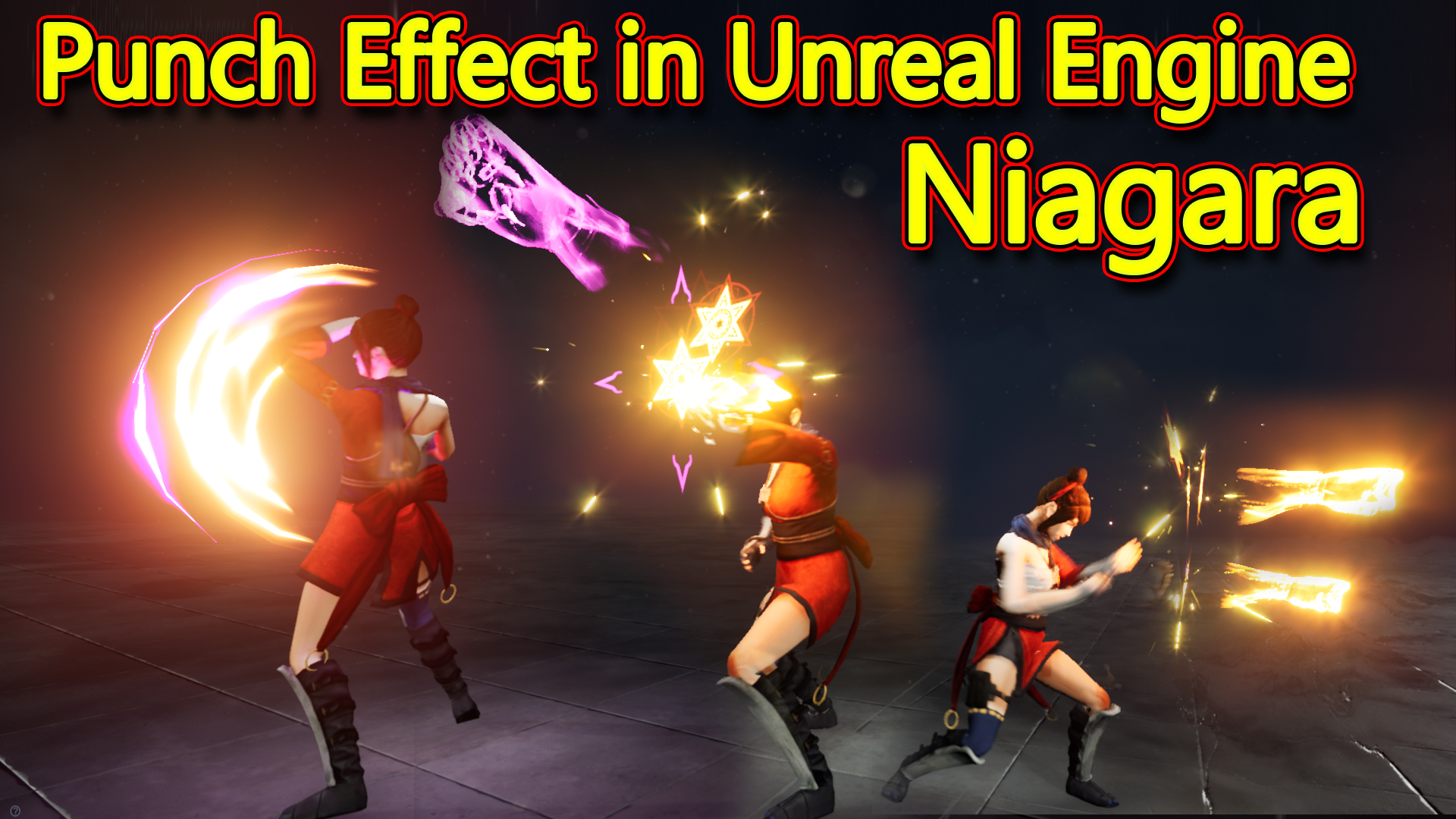

In this tutorial you will learn how to create Punch Effect in unreal engine Niagara. you will learn every step for this effect texture, materials, mesh and emitters. For any concern comment below the video or create help thread in CGHOW form (discussion & help forum link below)
#cghow #unrealengine #gamevfx #gamefx #ue4vfx #ue4fx #niagara #unrealengineniagara #unrealenginevfxtutorials
●Upload Your Tutorials/Work – https://cghow.com/
…………………………………………………………………………………………………………
Purchase Effect Package From Unreal engine Marketplace –
●Niagara Effects Pack – http://bit.ly/2LWgZTx
●Advanced Magical FX – http://bit.ly/2XQYyXL
……………………………………………………………………………………………………………………………………
●Patreon – https://www.patreon.com/Ashif
……………………………………………………………………………………………………………………………………
●Follow FB Page – https://www.facebook.com/cghow0/
●Join FB Group – https://www.facebook.com/groups/cghow/
……………………………………………………………………………………………………………………………………
●Android App – http://bit.ly/2XUnhoR
……………………………………………………………………………………………………………………………………
Playlists-
●Unreal Engine Niagara Tutorials – http://bit.ly/2SmPEuT
●Unreal engine VFX Tutorials -http://bit.ly/2JNXyJZ
●Unity VFX Tutorials – http://bit.ly/2XNGlKz
……………………………………………………………………………………………………………………………………
●Discussion & Help Forum – http://bit.ly/2Lo0Er7
……………………………………………………………………………………………………………………………………


Title: Punch Effect in Unreal Engine | Simple & Effective Niagara VFX Tutorial
Description: In this video, I show you how to create a punch effect in Unreal Engine using Niagara. This simple but impactful effect is linked with the punch animation, making it play along with each hit. The effect includes distortions, slashes, sparks, and a punch visual to bring intensity and style to each punch.
Key Points:
- Effect Overview: This punch effect combines slashes, distortion, sparks, and punch shapes to create a visual effect synchronized with punch animations. Each component is tied to hand movements and is easily customizable.
- Components of the Punch Effect:
- Slash Effect: A simple slash visual following the hand motion, created using a mesh with an aura texture that erodes and fades over time.
- Distortion Burst: Two layers of distortion, with a primary and a secondary burst to add depth to the impact. The distortion scales and erodes over life.
- Fire Burst: A fire trail in the opposite direction, using a curved plane mesh with a simple texture. The fire gradually scales over its lifetime.
- Punch Shape: A punch visual, created with a custom mesh and noise texture, that scales up in the direction of the punch. Positioned with each punch to add emphasis to the impact.
- Star Shape: A star-shaped effect added to the punch for flair. Dynamic parameters allow customization of colors and shapes within the same material, selecting from different color channels.
- Sparks: Sparks spread in a radial pattern, adding energy to the punch. The sparks have randomized lifetimes, colors, and scales, and use gravity to fall naturally over time.
- Blueprint Integration: The effect is set up in a blueprint, with sound effects tied to the punch for added impact. The effect plays in a loop, synchronized with the punch animation for seamless visuals.
- Customization Tips:
- Use dynamic parameters to control erosion, color, and shape to give each punch a unique look.
- To scale the impact, increase particle spawn rates or adjust scaling parameters for the punch shapes and sparks.
- Duplicate and position particle emitters to sync with each punch movement, and any changes to the primary effect will reflect across all punches.
Tips: Experiment with different meshes, textures, and dynamic parameter settings to create unique punch effects for different character styles.
Tags: #UnrealEngine #PunchEffect #Niagara #VFX #GameDev #NiagaraPunchEffect #UnrealEngineVFX
Leave a Reply