

Original Effect – http://bit.ly/37erzPE
Support me on – https://www.patreon.com/Ashif
Support me on – paypal.me/9953280644
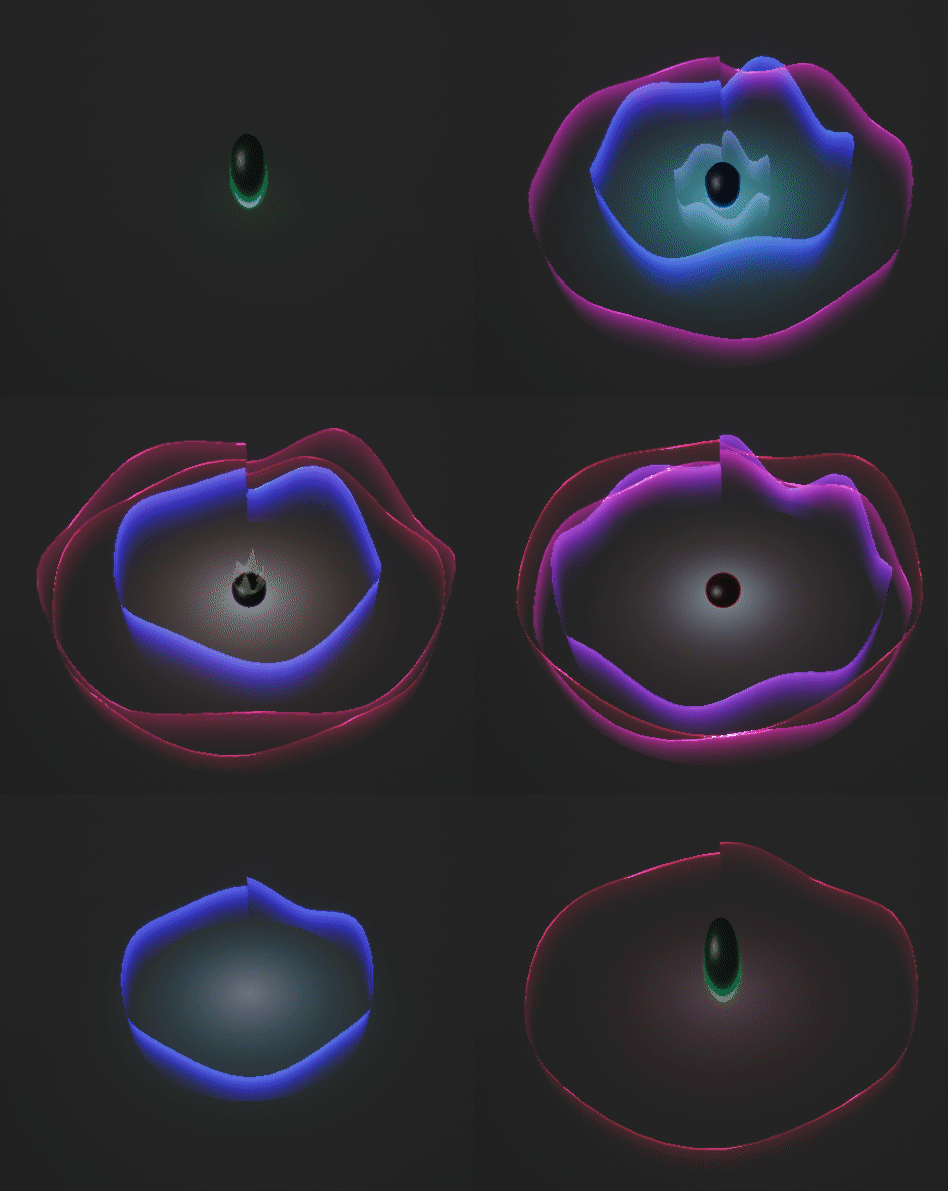
hi, guys today I have created this simple effect from magesbox in ue4 Niagara this tutorial is from scratch.
#cghow #RealtimeVFX #UE4Niagara #gamefx #ue4vfx #ue4fx #niagara #unrealengineniagara #unrealenginevfxtutorials
●Upload Your Tutorials/Work – https://cghow.com/
Purchase Effect Package From Unreal engine Marketplace –
Unreal Engine Niagara Effects in Marketplace – https://youtu.be/DF4Lb_btEus
Niagara Effects Pack in Marketplace – https://youtu.be/g6_k8T7FqHA
Unreal Engine Advanced Magical Effects in Marketplace – https://youtu.be/0Dn3GLIzhMo
Smoke in UE4 Niagara Pack01 in Unreal Engine Marketplace – https://youtu.be/38BPA_9yqJ8
UE4 Niagara Fire Pack 01 in Marketplace – https://youtu.be/PW5FL-zZoP4
UE4 Niagara Fire Pack 02 in Marketplace – https://youtu.be/fdLXPlUEzxM
UE4 Niagara Explosions Pack 02 in Marketplace – https://youtu.be/dj-XX9he4aE
Unreal Engine Niagara Effects Pack 03 in Marketplace – https://youtu.be/0kKon43I-Og
Slow Motion Explosion in UE4 Niagara Pack 04 in Marketplace – https://youtu.be/lUK1eW5zRP0
Unreal Engine Niagara Effects pack 04 in Marketplace – https://youtu.be/MihWYB31Gi4
Slow Motion Explosion in UE4 Niagara Pack 04 in Marketplace – https://youtu.be/lUK1eW5zRP0
UE4.25 Niagara Effects Pack 05 in Marketplace – https://youtu.be/sn1HIENVTDI
UE4.25 Niagara Effects Pack 06 in Marketplace – https://youtu.be/pvH_xGQ5jvs
Explosions Package in Unreal Engine Niagara Particle System – https://youtu.be/1mbqWscjUJ4
●Follow FB Page – https://www.facebook.com/cghow0/
●Join FB Group – https://www.facebook.com/groups/cghow/
●Android App – http://bit.ly/2XUnhoR
Playlists-
●Unreal Engine Niagara Tutorials – http://bit.ly/2SmPEuT
●Unreal engine VFX Tutorials -http://bit.ly/2JNXyJZ
●Unity VFX Tutorials – http://bit.ly/2XNGlKz


Video Title: How to Create a Simple Animated Sphere and Wave Effect in Unreal Engine
In this video, I’m going to show you how to create a simple yet cool effect using a few basic elements—an animated sphere, waves on a cylindrical shape, and some glow effects. I found this effect on magisbox.com, and I’ll walk you through creating it from scratch, teaching you how to animate waves in materials and control the sphere’s movement.
Steps Covered in the Tutorial:
- Setting Up the Map and Material:
- Created a basic material for the ground, with a grayish color and low specular.
- Added fog and adjusted light intensity.
- Animating the Sphere:
- Created a particle system for a sphere that scales up and down.
- Used Niagara to control the sphere’s size using a sine wave, with some offset for pivot adjustments.
- Made sure the animation stops after a set duration.
- Wave Material Creation:
- Built a material to simulate waves using texture coordinates and a sine wave to distort the texture.
- Applied a gradient mask for controlling the wave shape.
- Used noise textures to add randomization and variation to the wave height.
- Final Touches and Color Adjustments:
- Animated the wave material for a dynamic effect.
- Adjusted particle size and spawn rate for the waves.
- Added a glow effect on the ground to complement the waves.
- Sphere Behavior and Wave Interactions:
- Adjusted the sphere’s size and position to interact more realistically with the ground.
- Set random values for particle spawn and scaled the sphere for the final touch.
By the end of the video, you’ll know how to animate a sphere, create a simple wave effect, and add glow effects. Don’t forget to subscribe to my channel and comment if you have any questions. Keep learning and experimenting with Niagara in Unreal Engine!
Leave a Reply