Unreal engine ParallaxOcclusionMapping Depth Crack Tutorial

Unreal engine ParallaxOcclusionMapping Depth Crack Tutorial

Visit: https://cghow.com/ for more tutorials. submit your tutorial/Artworks.
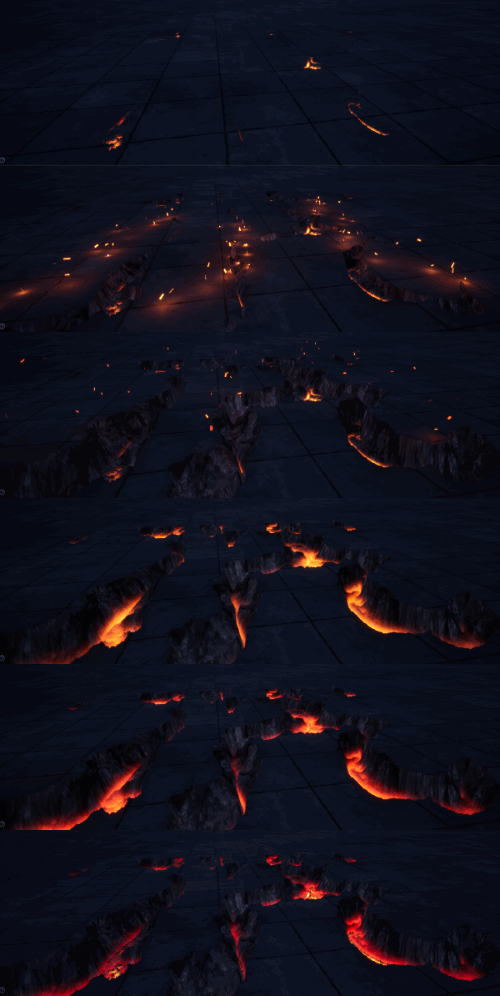
In this tutorial you will learn how to create ParallaxOcclusionMapping Depth Crack in unreal engine. you will learn every step for this effect texture, materials, mesh and emitters.

Video Description: In this tutorial, we dive into the creation of an ice attack effect, Video Description: In this detailed tutorial, we walk through creating a parallax material from scratch in Unreal Engine. Many of my subscribers have requested a full, step-by-step guide on how to create a parallax crack effect, and here it is! We’ll use basic material nodes and the parallax mapping technique to simulate depth and cracks, combining texture samples, normal maps, and pixel depth offset to create a convincing illusion.


Key Points:

  • Parallax Mapping: Use a parallax node for depth illusion.
  • Base Textures: Rock texture and a mask for cracks.
  • Normal Maps: Create realistic surface detail.
  • Pixel Depth Offset: Simulate crack depth with fake height.
  • Erosion Effect: Animate the crack eroding over time.
  • Particle Integration: Use particles to enhance the crack effect.

Tips:

  • Parallax Mapping: Ensure your texture is connected properly for accurate depth effects.
  • Erosion Animation: Use a power node for smooth animation of crack progression.
  • Normal Map Adjustments: Use the right vector channels for depth and detail.
  • Material Parameters: Tweak the height map and opacity mask for best results.
  • Particle Systems: Add particles like sparks or smoke for added realism.

Tags: #UnrealEngine #ParallaxMaterial #VFX #CrackEffect #GameDev #MaterialCreation #TextureMapping #ParticleEffects #Tutorial #NormalMap #HeightMap

Ashif Ali

I am Ashif Ali, Real-Time VFX Artist, I make Unreal Engine Niagara Tutorial on this channel. I've made it my mission to share my knowledge and expertise with the world through my YouTube channel. So why not join me on this exciting adventure? Follow me on my social links, subscribe to my channel, and support my growth as a creator. Together, we can create amazing things and take our skills to new heights. And who knows, you might even get access to some of my exclusive files for free!

Recent Posts

Turn Simple Grid into Electric Shock Cage VFX | Unreal Engine 5 Niagara Tutorial

https://youtu.be/5SecDek0mCE ⚡ Turn Simple Grid into Electric Shock Cage VFX | Unreal Engine 5 Niagara…

1 week ago

Mesh FX in Unreal Engine 5 Niagara Tutorial

https://youtu.be/0LoCTT7OJPs In this Unreal Engine 5 tutorial, you’ll learn how to create a stylized glowing…

2 weeks ago

Fantasy Magic Rainbow Spline VFX in UE5 Niagara Tutorial

https://youtu.be/OTSeWn2JGEA Learn how to create a vibrant Fantasy Magic Rainbow Spline VFX in Unreal Engine…

2 weeks ago

Turn Flat Laser Beams into Realistic Volumetric FX in UE5 Niagara

https://youtu.be/hW05dCOaeEg Learn how to upgrade flat, boring laser beams into realistic, glowing volumetric FX using…

3 weeks ago

UE5 Niagara Light Streak FX | Custom Material & Ribbon Tutorial

https://youtu.be/Ja1dA83sJYQ Learn how to create a stylized light streak material in Unreal Engine 5 and…

3 weeks ago

UEFN VFX Tutorial | Make ELECTRIC SPARKS & FUSE BURST (UE6 Ready) ⚡

Learn how to build a broken electric fuse box and wire sparks effect in UEFN…
3 weeks ago