

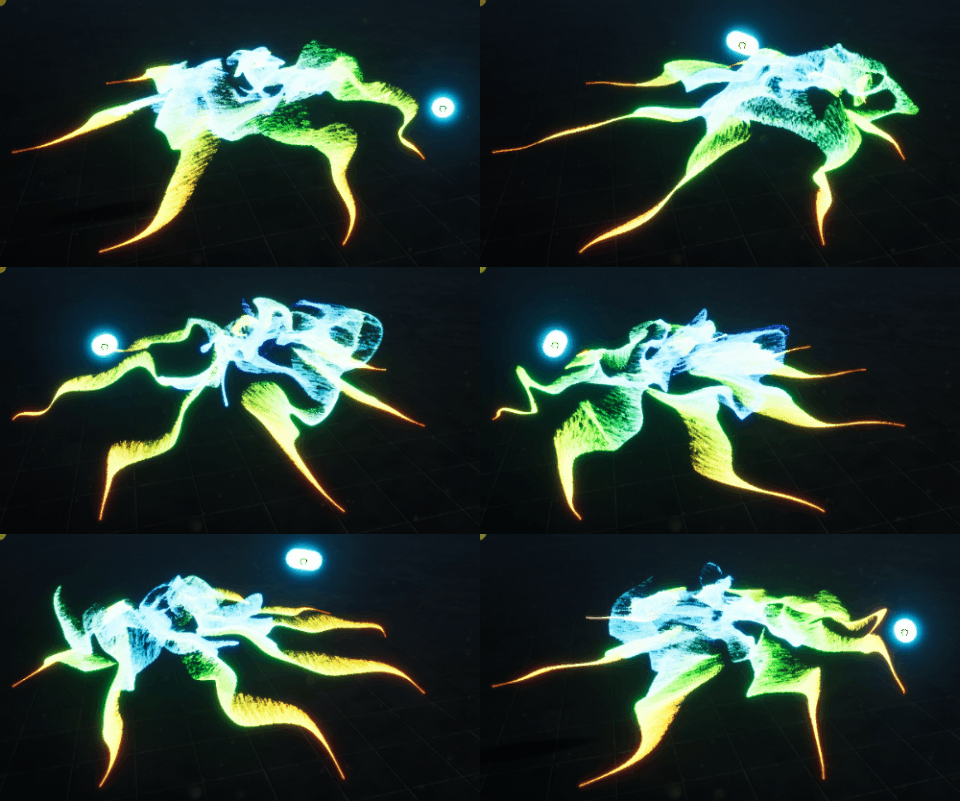
In this tutorial you will learn how to create user Attraction Force with Niagara Variable in Blueprint in unreal engine. you will learn every step for this effect texture, materials, mesh and emitters. For any concern comment below the video or create help thread in CGHOW form (discussion & help forum link below)
#cghow #unrealengine #gamevfx #gamefx #ue4vfx #ue4fx #niagara #unrealengineniagara #unrealenginevfxtutorials
●Upload Your Tutorials/Work – https://cghow.com/
…………………………………………………………………………………………………………
Purchase Effect Package From Unreal engine Marketplace –
●Niagara Effects Pack – http://bit.ly/2LWgZTx
●Advanced Magical FX – http://bit.ly/2XQYyXL
……………………………………………………………………………………………………………………………………
●Patreon – https://www.patreon.com/Ashif
……………………………………………………………………………………………………………………………………
●Follow FB Page – https://www.facebook.com/cghow0/
●Join FB Group – https://www.facebook.com/groups/cghow/
……………………………………………………………………………………………………………………………………
●Android App – http://bit.ly/2XUnhoR
……………………………………………………………………………………………………………………………………
Playlists-
●Unreal Engine Niagara Tutorials – http://bit.ly/2SmPEuT
●Unreal engine VFX Tutorials -http://bit.ly/2JNXyJZ
●Unity VFX Tutorials – http://bit.ly/2XNGlKz
……………………………………………………………………………………………………………………………………
●Discussion & Help Forum – http://bit.ly/2Lo0Er7
……………………………………………………………………………………………………………………………………


Creating Custom Particle Force Effects in Unreal Engine Niagara
In this tutorial, Ashif Ali from CGHOW demonstrates how to create a custom particle force effect using Unreal Engine’s Niagara particle system. The effect is based on a “Point Attractor” that can manipulate particles within a defined radius, drawing them toward a central point. This tutorial walks you through setting up a custom force system, utilizing a point attractor to control the movement of particles, and providing options to dynamically adjust the force through a blueprint.
By controlling parameters like particle spawn rate, radius, and attraction strength, you can create a wide variety of effects such as glowing particles attracted to a moving object, particles colliding with the ground, or even creating laser-like effects. The tutorial also covers how to link the attractor to an actor in the scene, giving you real-time control over the particle system.
Key Notes:
- Custom Particle Force: The “Point Attractor” force is used to pull particles toward a defined point in space. This radius can be adjusted to control how far the particles will be attracted.
- Dynamic Control: The attractor’s position can be controlled through a blueprint, allowing you to link the attractor to a movable object in the scene.
- Spawn Rate: Particles are spawned at a rate of 500 to create a dense and impactful effect.
- Attraction Parameters: Adjust the radius, strength, and position of the attractor to influence how the particles move. The closer the attractor is to the particles, the faster they will move.
- Particle Materials: Simple radial materials can be applied to the particles for visual effects, with options to change the color, size, and behavior.
- Light Integration: The attractor can be linked to a light source that moves with it, allowing the light to illuminate the particles dynamically.
- Collision Options: The tutorial touches on adding collision to particles, though this can be computationally expensive when dealing with large numbers of particles.
- Advanced Effects: Using noise, drag, and scaling can enhance the particle movement, creating more complex and realistic behaviors.
- Performance Considerations: Lowering the particle spawn rate and using optimization techniques can help improve performance for large-scale effects.
Trading Tags:
- Unreal Engine
- Niagara VFX
- Particle Force
- Point Attractor
- Blueprint Integration
- Custom VFX
- Particle Collision
- Game Effects
- VFX Tutorial
- 3D Animation
Additional Notes:
This tutorial provides an essential introduction to using forces in Unreal Engine Niagara, focusing specifically on the “Point Attractor” to manipulate particle systems in real-time. The ability to control the attractor’s position dynamically allows for endless possibilities, from creating effects tied to moving objects to creating interactive or environmental effects in games.
For further exploration, you can expand on this tutorial by experimenting with other Niagara modules, such as forces that push particles outward or using collision-based interactions for even more complex behaviors.
For more in-depth VFX tutorials and to support Ashif Ali’s work, subscribe to the CGHOW YouTube channel and visit the Patreon page for exclusive content.
Leave a Reply