

Download – https://www.patreon.com/posts/57499749
Reference – Twitter – @lateasusual_ – https://bit.ly/2XkB2TH
👉👉 If you Liked it – http://bit.ly/2UZmiZ4
Channel Ashif – http://bit.ly/3aYaniw
Support me on – https://www.patreon.com/Ashif
Support me on – paypal.me/9953280644
Volume Dissolve in UE5 Niagara Tutorial | Download Files
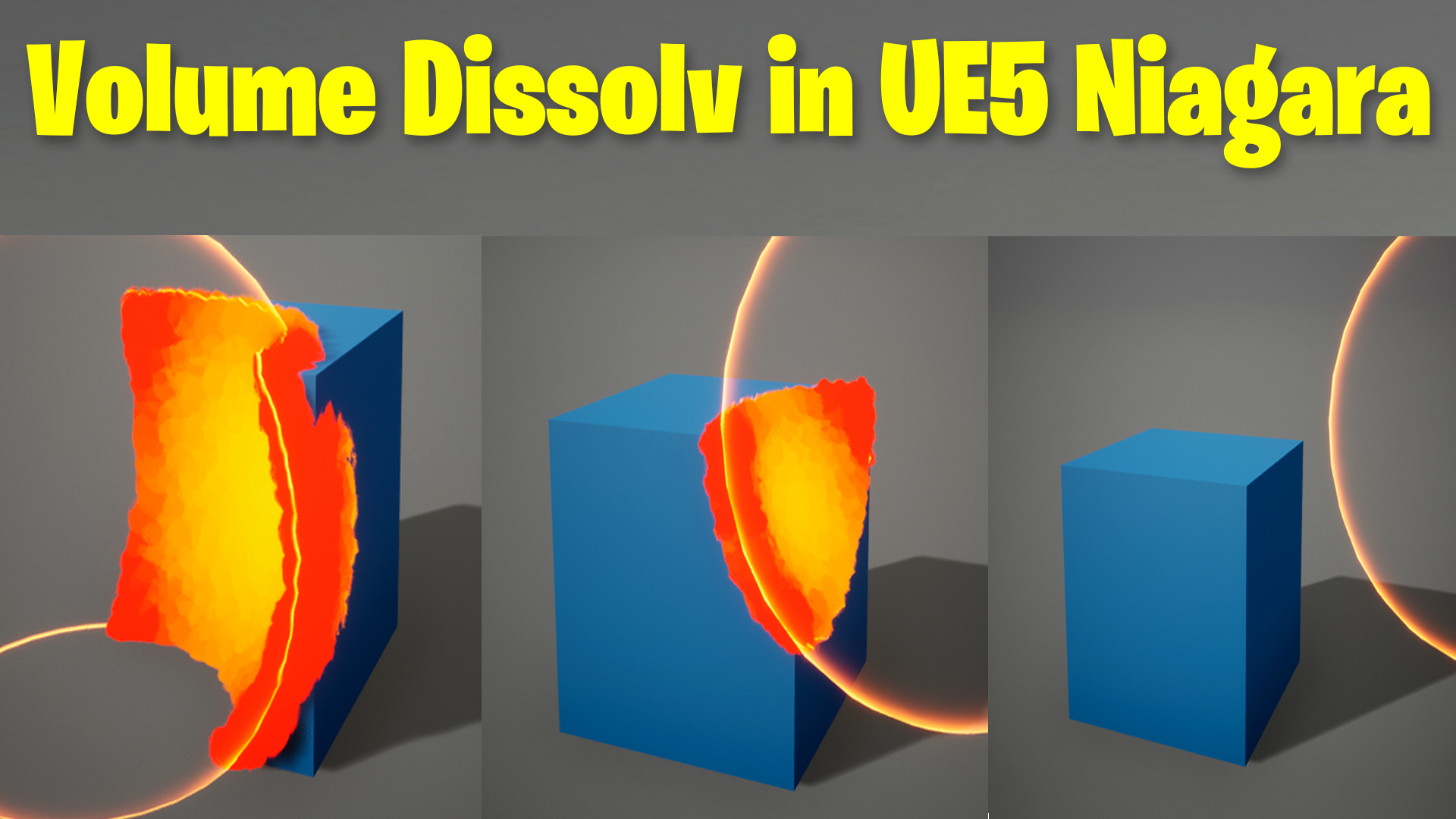
today I have created this volume dissolve effect in ue5 Niagara used a simple trick first I dissolved mesh that is a cube in this tutorial with sphere mask in material add linked sphere mask location with sphere mesh in the viewport using blueprint then I created the same size particle bunch as grid location placed it in the viewport at the same location as my cube mesh then I used distance range in particle to change the size of the particle and linked the range location with same sphere in the viewport.
#cghow #UE5 #UE4Niagara #gamefx #ue5niagara #ue4vfx #niagara #unrealengineniagara #realtimevfx
●Upload Your Tutorials/Work – https://cghow.com/
Purchase Effect Package From Unreal engine Marketplace –
Unreal Engine Niagara Effects in Marketplace – https://youtu.be/DF4Lb_btEus
Niagara Effects Pack in Marketplace – https://youtu.be/g6_k8T7FqHA
Unreal Engine Advanced Magical Effects in Marketplace – https://youtu.be/0Dn3GLIzhMo
Smoke in UE4 Niagara Pack01 in Unreal Engine Marketplace – https://youtu.be/38BPA_9yqJ8
UE4 Niagara Fire Pack 01 in Marketplace – https://youtu.be/PW5FL-zZoP4
UE4 Niagara Fire Pack 02 in Marketplace – https://youtu.be/fdLXPlUEzxM
UE4 Niagara Explosions Pack 02 in Marketplace – https://youtu.be/dj-XX9he4aE
Unreal Engine Niagara Effects Pack 03 in Marketplace – https://youtu.be/0kKon43I-Og
Slow Motion Explosion in UE4 Niagara Pack 04 in Marketplace – https://youtu.be/lUK1eW5zRP0
Unreal Engine Niagara Effects pack 04 in Marketplace – https://youtu.be/MihWYB31Gi4
Slow Motion Explosion in UE4 Niagara Pack 04 in Marketplace – https://youtu.be/lUK1eW5zRP0
UE4.25 Niagara Effects Pack 05 in Marketplace – https://youtu.be/sn1HIENVTDI
UE4.25 Niagara Effects Pack 06 in Marketplace – https://youtu.be/pvH_xGQ5jvs
Explosions Package in Unreal Engine Niagara Particle System – https://youtu.be/1mbqWscjUJ4
●Follow FB Page – https://www.facebook.com/cghow0/
●Join FB Group – https://www.facebook.com/groups/cghow/
●Android App – http://bit.ly/2XUnhoR
Playlists-
●Unreal Engine Niagara Tutorials – http://bit.ly/2SmPEuT
●Unreal engine VFX Tutorials -http://bit.ly/2JNXyJZ
●Unity VFX Tutorials – http://bit.ly/2XNGlKz
Volume Dissolve Effect in UE5: Step-by-Step Guide
In this tutorial, Asif Ali from CGHOW demonstrates how to create a stunning volume dissolve effect in Unreal Engine 5, inspired by a Twitter user who initially created a similar effect in Blender. The effect showcases a box dissolving into a spherical volume, which can be scaled for dynamic visuals. Although this effect isn’t an exact replica of the original, it offers a similar visual appeal and serves as a great starting point for your own projects.
Key Notes:
- Effect Overview:
- This tutorial focuses on creating a dissolving effect where a cube dissolves based on a spherical volume mask.
- The dissolve effect is controlled using a Sphere Mask within a material, with a dynamic parameter controlling the radius and location of the sphere.
- The material uses a basic blue color with an opacity mask that reacts to the sphere’s location and radius.
- The dissolve effect is not static—by modifying the sphere’s location and scale in the blueprint, you can manipulate the dissolve’s progression in real-time.
- Setting up the Material:
- A simple material is created for the cube with a Sphere Mask, using world position to define the area affected by the dissolve.
- The material uses parameters like sphere location, radius, and hardness to determine how the cube dissolves.
- A material parameter collection (MPC) is used to dynamically set these values in the blueprint.
- Blueprint Setup:
- The sphere’s position and radius are controlled via blueprint to animate the dissolving effect.
- The blueprint takes the sphere’s scale, multiplies it, and updates the parameters in real-time, creating the dynamic dissolve effect.
- Particles are added at the edges of the dissolving cube, using distance-based logic to control their position and behavior.
- Particle System:
- The particle system is set up in a grid layout, with particles being spawned where the sphere mask intersects the cube.
- A dynamic parameter is used to modify particle size and color based on the distance from the sphere’s center.
- To create sharper edges, the tutorial demonstrates using noise in the material and contrast techniques to ensure the dissolve effect looks crisp.
- Adjusting the Effect:
- The particle system and material settings are fine-tuned for visual quality, with color lerping, edge sharpening, and distance-based particle effects.
- The radius and location parameters can be adjusted for flexibility, allowing you to animate the dissolve effect at any scale.
Trendy Tags:
- #UnrealEngine5
- #NiagaraVFX
- #VolumeDissolve
- #UE5Tutorial
- #ParticleEffects
- #CGHOW
- #GameDev
- #VFX
- #UE5Blueprints
Additional Notes:
- Dynamic Parameters:
The tutorial emphasizes the use of dynamic parameters for real-time adjustments in the particle system, making the dissolve effect more interactive and customizable. - Troubleshooting UE5 Crashes:
Asif Ali mentions some issues with Unreal Engine 5 crashing during development. He provides some troubleshooting tips, including updating graphic drivers and adjusting MSI settings, which may help prevent these crashes during development. - Patreon Support:
The project files are available for download on Asif Ali’s Patreon, allowing viewers to access the completed effect and experiment with it in their own projects. - Next Steps:
Experiment with the dissolve effect by adjusting the sphere’s parameters in your own Unreal Engine 5 projects. Try using different particle types, colors, and materials to create unique variations of the effect.
Leave a Reply