
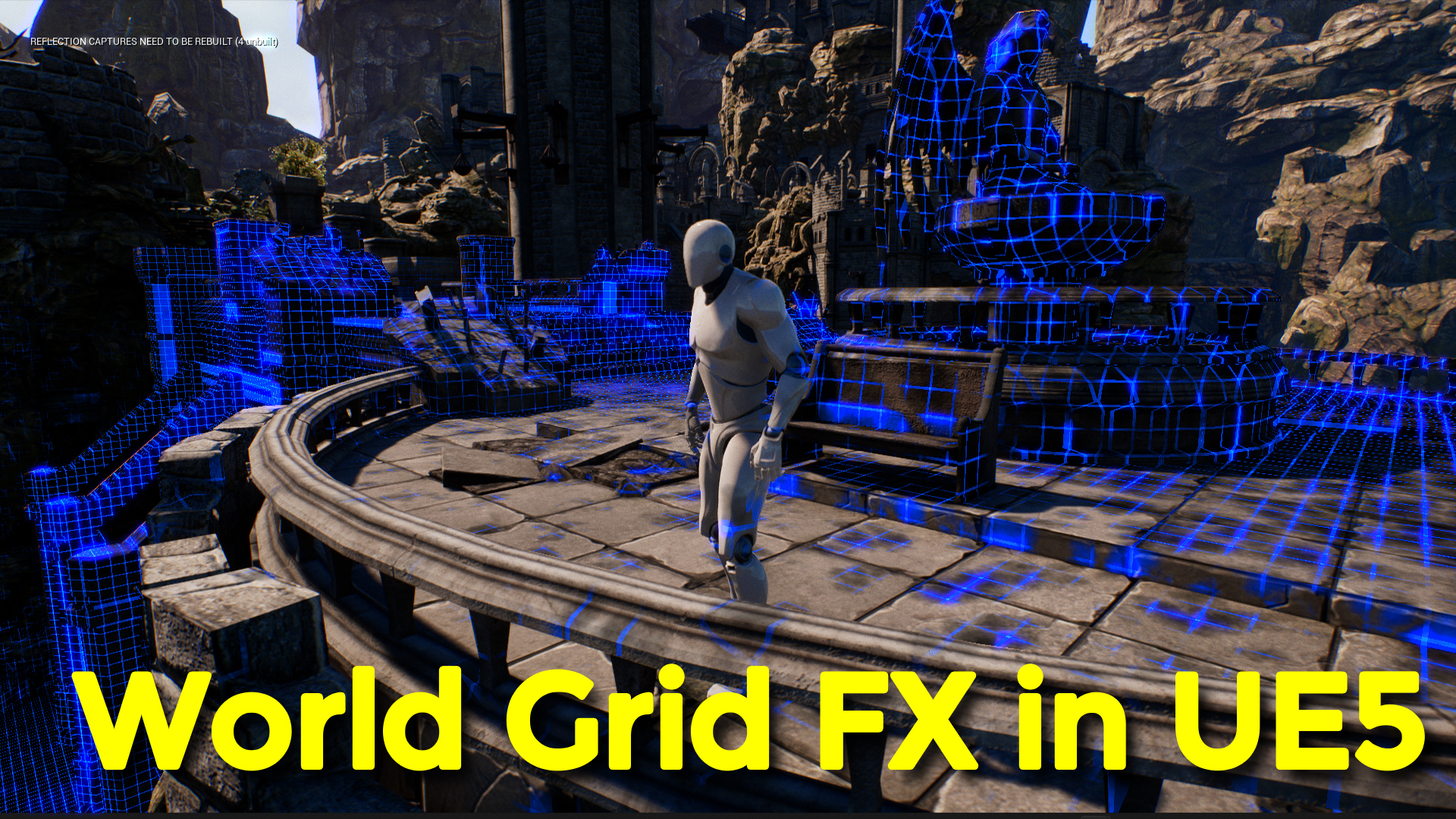

Download UE5 Project Files from Patreon – https://www.patreon.com/posts/53751364
Channel Ashif – http://bit.ly/3aYaniw
Support me on – https://www.patreon.com/Ashif
Support me on – paypal.me/9953280644
World Grid Effect with Post Process Material in UE5 | Download Project Files
#cghow #UE5 #UE4Niagara #gamefx #ue4vfx #ue4fx #niagara #ue4niagara #unrealengineniagara #unrealenginevfxtutorials
●Upload Your Tutorials/Work – https://cghow.com/
Purchase Effect Package From Unreal engine Marketplace –
Unreal Engine Niagara Effects in Marketplace – https://youtu.be/DF4Lb_btEus
Niagara Effects Pack in Marketplace – https://youtu.be/g6_k8T7FqHA
Unreal Engine Advanced Magical Effects in Marketplace – https://youtu.be/0Dn3GLIzhMo
Smoke in UE4 Niagara Pack01 in Unreal Engine Marketplace – https://youtu.be/38BPA_9yqJ8
UE4 Niagara Fire Pack 01 in Marketplace – https://youtu.be/PW5FL-zZoP4
UE4 Niagara Fire Pack 02 in Marketplace – https://youtu.be/fdLXPlUEzxM
UE4 Niagara Explosions Pack 02 in Marketplace – https://youtu.be/dj-XX9he4aE
Unreal Engine Niagara Effects Pack 03 in Marketplace – https://youtu.be/0kKon43I-Og
Slow Motion Explosion in UE4 Niagara Pack 04 in Marketplace – https://youtu.be/lUK1eW5zRP0
Unreal Engine Niagara Effects pack 04 in Marketplace – https://youtu.be/MihWYB31Gi4
Slow Motion Explosion in UE4 Niagara Pack 04 in Marketplace – https://youtu.be/lUK1eW5zRP0
UE4.25 Niagara Effects Pack 05 in Marketplace – https://youtu.be/sn1HIENVTDI
UE4.25 Niagara Effects Pack 06 in Marketplace – https://youtu.be/pvH_xGQ5jvs
Explosions Package in Unreal Engine Niagara Particle System – https://youtu.be/1mbqWscjUJ4
●Follow FB Page – https://www.facebook.com/cghow0/
●Join FB Group – https://www.facebook.com/groups/cghow/
●Android App – http://bit.ly/2XUnhoR
Playlists-
●Unreal Engine Niagara Tutorials – http://bit.ly/2SmPEuT
●Unreal engine VFX Tutorials -http://bit.ly/2JNXyJZ
●Unity VFX Tutorials – http://bit.ly/2XNGlKz
Video Title: Creating a World-Scale Grid Effect in Unreal Engine 5 with Post Process and Material
Video Description: Hello everyone! I’m Asif Ali, and you’re watching CGHOW. Today, I’ve created an immersive world-scale grid effect using post-process and material in Unreal Engine 5. In this tutorial, I’ll guide you through each step to achieve this unique effect. You can download this project file on my Patreon to follow along or explore it on your own. Make sure to subscribe to my channel and hit the bell icon to stay updated with my latest videos!
Key Steps Covered:
- Setting Up the Project – Using a third-person template and Infinity Blade map.
- Post-Process Setup – Setting up and applying a post-process effect with a bound, and making it global with “infinity extend unbound.”
- Material Creation – Crafting a spherical mask for world position and linking it to the camera to follow the character.
- Grid Material Construction – Building a grid material using world position, tiling, and axis masking for a top-down, wall-inclusive effect.
- Distortion Effects – Adding noise and texture to create edge distortion.
- Scene Integration – Integrating the grid effect into the existing scene with a seamless background.
- Animation and Parameter Control – Using level blueprints to animate the grid’s radius for dynamic expansion.
Tags: #UnrealEngine #UnrealEngine5 #CGHOW #VFX #GridEffect #PostProcess #MaterialCreation #UE5Tutorial #GameDevelopment #NiagaraVFX #PatreonContent #3DEffects #UE5Tips
Additional Notes:
- Adjust the radius and distortion settings to suit different environments or effects.
- You can customize grid colors and hardness for varied visual styles, creating unique effects.
- For future tutorials, explore integrating this effect with gameplay elements, like environment transitions or interactive UI feedback.
Leave a Reply