RealtimeVFX

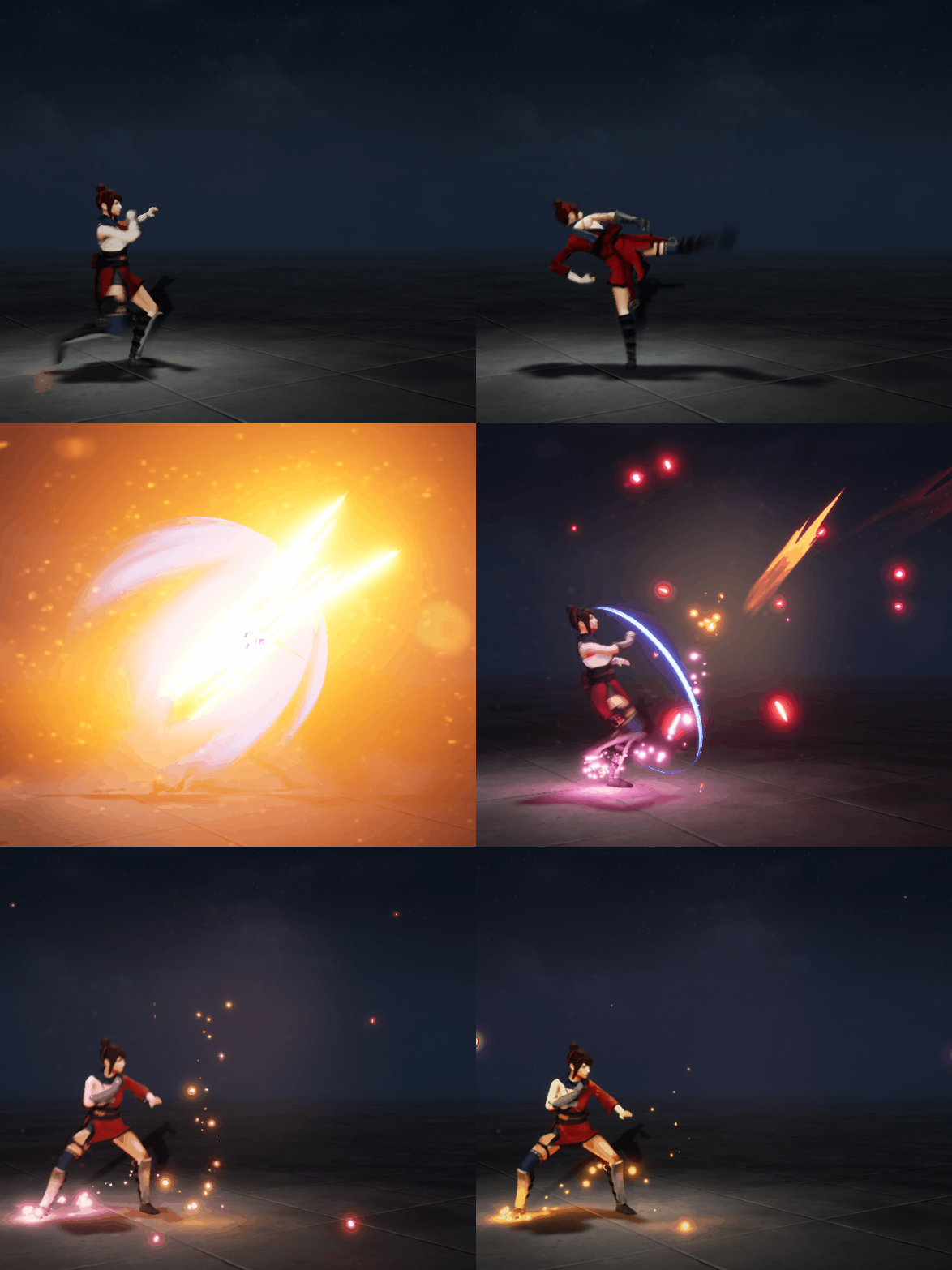
Unreal Engine Niagara Tutorial | Kick Effect

Unreal Engine Niagara Tutorial | Kick Effect

In this tutorial you will learn how to create this in unreal engine. you will learn every step for this effect texture, materials, mesh and emitters. For any concern comment below the video or create help thread in CGHOW form (discussion & help forum link below)

#cghow #unrealengine #gamevfx #gamefx #ue4vfx #ue4fx #niagara #unrealengineniagara #unrealenginevfxtutorials

●Upload Your Tutorials/Work – https://cghow.com/
…………………………………………………………………………………………………………
Purchase Effect Package From Unreal engine Marketplace –
●Niagara Effects Pack – http://bit.ly/2LWgZTx
●Advanced Magical FX – http://bit.ly/2XQYyXL
……………………………………………………………………………………………………………………………………
●Patreon – https://www.patreon.com/Ashif
……………………………………………………………………………………………………………………………………

●Follow FB Page – https://www.facebook.com/cghow0/
●Join FB Group – https://www.facebook.com/groups/cghow/
……………………………………………………………………………………………………………………………………
●Android App – http://bit.ly/2XUnhoR
……………………………………………………………………………………………………………………………………
Playlists-
●Unreal Engine Niagara Tutorials – http://bit.ly/2SmPEuT
●Unreal engine VFX Tutorials -http://bit.ly/2JNXyJZ
●Unity VFX Tutorials – http://bit.ly/2XNGlKz
……………………………………………………………………………………………………………………………………
●Discussion & Help Forum – http://bit.ly/2Lo0Er7
……………………………………………………………………………………………………………………………………

Title: Kick Effect in Unreal Engine | Niagara VFX Tutorial

Description: In this tutorial, I demonstrate how to create a dynamic kick effect in Unreal Engine Niagara. This effect is designed to activate when a character performs a kick, featuring particle effects like sparks, flashes, and distortions that emphasize the impact. I break down each element involved in this effect to help you create your own custom VFX for animations in Unreal Engine.

Key Points:

  • Effect Overview: The kick effect consists of two main parts: foot sparks, which are linked to the character’s leg, and the main kick system, which activates around the impact area.
  • Components of the Kick System:
    • Foot Sparks: Connected to the character’s right toe base. Two emitters create pink-to-yellow sparks that scale with a sine wave for a flickering effect.
    • Main Kick Effect Elements:
      • Fire Element: Uses a curved mesh with a simple red texture. Particles are randomly oriented and scale up over their lifetime.
      • Flash and Flash 2: A bright flash at the impact point, using textures with color transitions (orange or blue to purple) and a short lifespan for a quick burst.
      • Shield & Ring Effects: Rings and shields use half-sphere meshes with a texture that animates down the mesh, creating a “shielding” effect around the leg.
      • Sparks: High-velocity particles shoot from the impact point in both directions. The main sparks have high velocity and scale from yellow to red, while inverted sparks have a reversed direction.
      • Distortion Effect: Adds visual distortion at the impact point using a panning normal map to simulate a wave effect.
      • Afterglow: A yellow-to-pink glow surrounds the impact area, using a radial ramp with a large particle size for a subtle aura.
  • Technical Details: Particles are scaled and colored dynamically to match the movement of the character’s leg. Dynamic parameters are used to control texture animations and orientation, syncing the effect with the character’s kick motion.

Tips: Experiment with different textures, colors, and scaling values to achieve unique effects tailored to various character animations. Troubleshooting mouse-movement issues in the editor may be necessary, as some trail behaviors could vary in Unreal Engine’s play mode.


Tags: #UnrealEngine #KickEffect #Niagara #VFX #GameDev #ParticleSystem #UnrealEngineVFX

Ashif Ali

I am Ashif Ali, Real-Time VFX Artist, I make Unreal Engine Niagara Tutorial on this channel. I've made it my mission to share my knowledge and expertise with the world through my YouTube channel. So why not join me on this exciting adventure? Follow me on my social links, subscribe to my channel, and support my growth as a creator. Together, we can create amazing things and take our skills to new heights. And who knows, you might even get access to some of my exclusive files for free!

Recent Posts

Shield Aura VFX in Unreal Engine 5 Niagara – Game-Ready Tutorial

https://youtu.be/LTwOZBko830 In this video, I showcase a completely revamped, cleaned-up, and optimized Shield Aura VFX…

4 days ago

Magical Aura VFX in Unreal Engine 5 Niagara – Remastered Tutorial

https://youtu.be/qL3cjAclffw In this video, I showcase an updated and optimized Magical Aura Effect created in…

5 days ago

Magical Aura Burst VFX in Unreal Engine 5 Niagara – Blueprint Setup

https://youtu.be/yhjWyNIQXYk In this video, I showcase an upgraded and remastered Magical Aura Burst Effect in…

6 days ago

UEFN VFX Tutorial | How to Create FALLING LEAVES (UE6 Ready) 🍃

https://youtu.be/hMT0gl0x80E Tutorial - https://youtu.be/bLbbt8cWQd0In this UEFN VFX tutorial, learn how to create a high-quality, Stylized…

2 weeks ago

Nature AOE Spell VFX in Unreal Engine 5 Niagara – Cascade to Niagara Conversion

https://youtu.be/ZuDPGVR_DI0 In this video, I showcase a modernized and upgraded Nature AOE (Area of Effect)…

2 weeks ago

Petals Aura in Unreal Engine 5 Niagara

https://youtu.be/4RptzI-oYt4 Create a beautiful Petals Aura in Unreal Engine 5 Niagara – a soft, elegant,…

2 weeks ago